此翻译由机器生成,尚未经过人工审核。 会说这种语言吗? 查看评论。

Microsoft Surface Pro X SSD 更换

最后更新于 2026年8月15日
浏览量: 4.4万
浏览统计数据:
- 过去24小时
- 9
- 过去 7 天:
- 60
- 过去 30 天:
- 243
- 总计
- 44,339
评论: 8
2 comments on steps, 6 guide comments.
Go to guide comments已完成: 8 9
8 人已将本指南标记为“已完成”。你会是下一个完成的人吗?
9 人已将本指南标记为“已完成”。包括你——干的漂亮!
收藏: 1 2
1 人收藏(并订阅)了本指南。你会是下一个吗?
2 人收藏(并订阅)了本指南——这其中包括你!
简介
转到步骤 1 ↓按照本指南拆卸 Microsoft Surface Pro X 中的 SSD。由于该 SSD 带有专有的屏蔽层,普通 M.2 2230 硬盘可能无法完全兼容。
在进行此项维修之前,请尽可能备份你现有的 SSD。然后,熟悉一下[Internet 恢复]或[制作可启动外部驱动器],这样你就能准备好将操作系统安装到新硬盘上,并将数据迁移到新的 SSD 中。
你所需要的


-
-
-
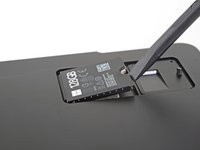
将 SIM 卡顶针或回形针插入 SSD 和 SIM 卡槽盖板右下角的小孔中,该孔位于 Surface 右下角附近。
-
用力按压以打开盖板。
-
-
-


 询问修复机器人


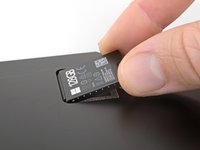
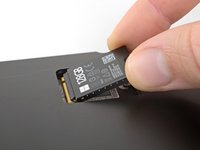
若要重新组装你的设备,请按上述步骤的相反顺序进行操作。
请将你的电子废弃物送往 R2 或 e-Stewards 认证的回收商。
维修过程不如预期?请查看我们的 Answers 社区,获取故障排除帮助。
8等其他人完成本指南。

6指南评论
The only question remaining is: where does one purchase a M2. 2230 SSD?
How do you clone or copy windows to the new drive?
Ismail Akudi - 回复 分享
To “richard.brock57”, you can search for M.2 2230 SSD and you should find retailers including CDW, Newegg and Insight who sell these. Or you can look specifically for a version, such as KIOXIA BG4 (Kioxia is the rebranding of Toshiba’s SSD drive business). Unfortunately retailers do not yet sell the 1TB version (at least as of my writing this on May 12, 2020), so if you really want 1TB you can do what this fellow did:
https://dancharblog.wordpress.com/2020/0... who purchases the Caldigit Tuf Nano 1TB external drive and swaps the Kioxia BG4 1TB M.2 2230 SSD in there for the one in his Surface Pro X. Currently that drives sells for $219 on Amazon.
To “Ismail Akudi”, you can go to https://support.microsoft.com/en-us/surf... to download a recovery image of Windows 10 onto a USB drive and use that to set up your Surface after you’ve upgraded the drive. You can look at the instructions at the link; they’re reasonably straightforward.
Where can one find a replacement 2.4mm screw, and what is the exact size/type?
