跳转到主内容
加入维修社区 - 创建账户

Microsoft Surface Pro 5 Screen Replacement

已存档的指南
本指南只作为历史记录保留。请使用指南的最新版本来进行维修。

你所需要的

  1. Microsoft Surface Pro 5 Screen Replacement, Screen: 步骤 1 中的图像 1,1
    • Before you begin, discharge the Surface Pro's battery below 25%. A charged lithium-ion battery can catch fire and/or explode if accidentally damaged during the repair.

    • The display is strongly glued to the frame of the device.

    • To remove the display, first soften the adhesive by applying heat. You can use a heat pad, heat gun, or iOpener. In a pinch, a hair dryer can also work.

    • Be careful when using a heat gun, as too much heat can permanently damage the display and/or battery.

    • Steadily and evenly heat the perimeter of the display until it's too hot to touch, and try to maintain that temperature for several minutes.

  2. Microsoft Surface Pro 5 Screen Replacement: 步骤 2 中的图像 1,3 Microsoft Surface Pro 5 Screen Replacement: 步骤 2 中的图像 2,3 Microsoft Surface Pro 5 Screen Replacement: 步骤 2 中的图像 3,3
    • Use a suction cup or an iSclack to pull up on the glass and create a slight gap between the glass and the metal frame.

    • If your display is badly cracked, a suction cup may not adhere. It may help to first cover the display with a layer of packing tape. Alternatively, you can superglue your suction cup to the display.

    • Insert an opening pick into the gap.

    • Slide the pick around the sides and bottom of the display to cut the adhesive. Apply more heat as needed.

    • Work carefully—the glass is thin and will crack easily if you try to force it.

    • Separate the top edge last. There are antennas on both sides, so be careful not to damage them. Use more heat or a bit of isopropyl alcohol to help weaken the adhesive.

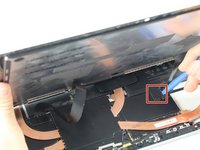
  3. Microsoft Surface Pro 5 Screen Replacement: 步骤 3 中的图像 1,2 Microsoft Surface Pro 5 Screen Replacement: 步骤 3 中的图像 2,2
    • Pry up the metal shield covering the smaller ribbon cable port using the plastic opening tool.

    • Disconnect the smaller ribbon cable by prying up with the nylon spudger.

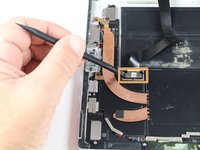
  4. Microsoft Surface Pro 5 Screen Replacement: 步骤 4 中的图像 1,2 Microsoft Surface Pro 5 Screen Replacement: 步骤 4 中的图像 2,2
    • Pry up the metal shield covering the larger ribbon cable port using the plastic opening tool and remove.

    • Disconnect the larger ribbon cable by prying up with the nylon spudger.

  5. Microsoft Surface Pro 5 Screen Replacement: 步骤 5 中的图像 1,1
    在这个步骤中使用的工具:
    Tesa 61395 Tape
    $8.95
    • Remove the screen from the rest of the device .

    • To replace the adhesive securing the screen, carefully remove any old adhesive from both the device and the back of the display. Clean and prep the surface with isopropyl alcohol and a lint-free cloth, swiping the cloth in one direction (not back and forth). Apply a strong double-sided tape, such as 2 mm Tesa 61395.

结论

To reassemble your device, follow these instructions in reverse order.

Caleb Granch

于10/02/17注册

1,010 声望

创作了2篇指南

团队

Cal Poly, Team S15-G3, Livingston Fall 2017 Cal Poly, Team S15-G3, Livingston Fall 2017 的会员

CPSU-LIVINGSTON-F17S15G3

3 名成员

创作了17篇指南

0指南评论

添加评论

浏览统计数据:

过去 24 小时: 0

过去 7 天: 6

过去 30 天: 25

总计 139