跳转到主内容

Microsoft Surface Pro 2 LCD屏幕更换

你所需要的

  1. Microsoft Surface Pro 2 LCD屏幕更换, LCD 屏幕: 步骤 1 中的图像 1,2 Microsoft Surface Pro 2 LCD屏幕更换, LCD 屏幕: 步骤 1 中的图像 2,2
    • 为避免电击,请在继续操作前拔下 Surface Pro 2 的电源插头并为设备关机。

  2. Microsoft Surface Pro 2 LCD屏幕更换: 步骤 2 中的图像 1,1
    • 请避免皮肤或眼睛直接接触加热垫或加热枪,可能会对身体造成伤害

    • 使用加热垫或加热枪加热屏幕边缘以软化胶水。该区域距离设备边缘大约一英寸(2.54厘米)。

    • 胶水位于设备显示屏深色边框的下方。

  3. Microsoft Surface Pro 2 LCD屏幕更换: 步骤 3 中的图像 1,1
    • 使用塑料开口工具和吸盘作为杠杆撬起,然后把开口工具一侧的边缘的轻轻插入滤网的角下。

    • 如果开口工具无法轻易的插入屏幕下方,请在继续前重新加热。

    • 慢慢地将工具绕过整个屏幕边缘。

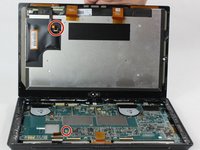
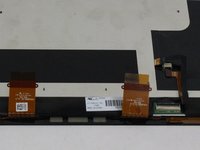
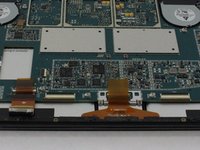
  4. Microsoft Surface Pro 2 LCD屏幕更换: 步骤 4 中的图像 1,3 Microsoft Surface Pro 2 LCD屏幕更换: 步骤 4 中的图像 2,3 Microsoft Surface Pro 2 LCD屏幕更换: 步骤 4 中的图像 3,3
    • 拉住用来连接屏幕和主板的橙色电缆上的标签,将其分离,然后使用尼龙塞以拔下这些电缆。

    • 请注意第三个红色的小接头。

    • 待胶水冷却后,再让其接触任何其他表面。

结论

如要组装回设备,请按照相反的顺序操作

6等其他人完成本指南。

由衷感谢以下译者:

en zh

100%

xiaoniao_正在帮助我们修复这个世界! 您也想加入吗?
开始翻译 ›

Mathew B

于09/19/16注册

323 声望

创作了2篇指南

团队

USF Tampa, Team 6-2, Remmell Fall 2016 USF Tampa, Team 6-2, Remmell Fall 2016 的会员

USFT-REMMELL-F16S6G2

4 名成员

创作了11篇指南

5指南评论

After replacing the screen my surface will turn on but the screen is just black.... in device manager its showing up as a 'Digital Flat Panel'

yet the screen is still black.. faulty replacement panel???

austin jones - 回复

Same thing happening to me… :(

Marco - 回复

I did this procedure but i dont know why the display is not working it blink and then turnoff can somebody help me how to fix this problem

Smart Instruments - 回复

I purchased a screen replacement (LCD and Digitizer), but apparently, the flex from the motherboard to the screen (the small connector in red as well as the one on the lcd) are missing. Is there a way or place I can purchase just those flex? Or do I need to get a whole new motherboard?

Roselite - 回复

Myne doesn't boot. The display is dack nothing happens. It's like it's not charging. What do I do. Thanks

ARCHER TABULEY - 回复

添加评论

浏览统计数据:

过去 24 小时: 2

过去 7 天: 11

过去 30 天: 53

总计 15,498