你所需要的
-
-
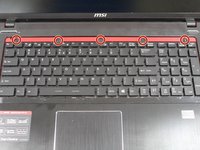
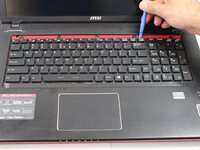
Insert iFixit opening tool as shown in the picture to pry up on the keyboard guard.
-
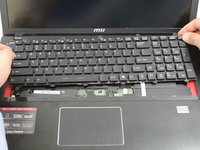
Remove the keyboard guard.
-
-


To reassemble your device, follow these instructions in reverse order.
2等其他人完成本指南。



团队

Oregon Institute of Technology, Team S1-G6, Lancaster Fall 2018 Oregon Institute of Technology, Team S1-G6, Lancaster Fall 2018 的会员
OIT-LANCASTER-F18S1G6
3 名成员
创作了8篇指南
2指南评论
What about step 4 detaching the ribbon cable?
yes missing the part of the 2 ribbon cables, one of them (the lighting) is not reachable like this..
you have to take out the battery, and then remove the back cover to reach the ribbon for the lighting
