跳转到主内容

Logitech Mouse MX1000 Disassembly

你所需要的

  1. Logitech Mouse MX1000 Disassembly, Open the housing: 步骤 1 中的图像 1,2 Logitech Mouse MX1000 Disassembly, Open the housing: 步骤 1 中的图像 2,2
    • There are four screws hidden on the bottom part of the mouse. Two are below the sticker, the last two are below the bottom pads.

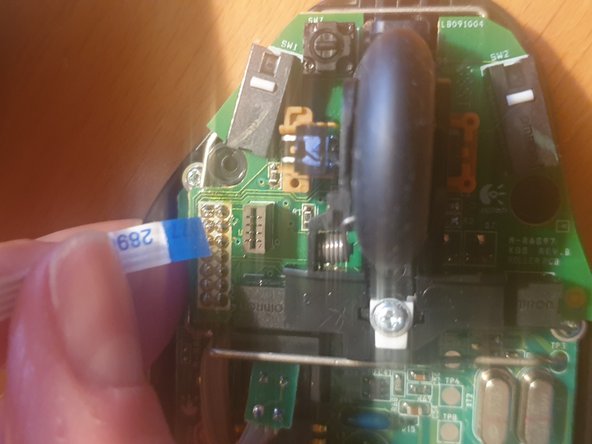
  2. Logitech Mouse MX1000 Disassembly, Disconnect the cables: 步骤 2 中的图像 1,3 Logitech Mouse MX1000 Disassembly, Disconnect the cables: 步骤 2 中的图像 2,3 Logitech Mouse MX1000 Disassembly, Disconnect the cables: 步骤 2 中的图像 3,3
    • Once the scews removed, carefully open the housing. Some cables hold both pieces together

    • First remove the tricolor battery cable

    • Then carefully remove the ribbon cable

  3. Logitech Mouse MX1000 Disassembly, Remove the battery: 步骤 3 中的图像 1,1
    • To remove the battery cover, two more screws need to be removed.

    • The battery is then held in place with a sticker within the housing.

  4. Logitech Mouse MX1000 Disassembly, Remove the board from the housing: 步骤 4 中的图像 1,3 Logitech Mouse MX1000 Disassembly, Remove the board from the housing: 步骤 4 中的图像 2,3 Logitech Mouse MX1000 Disassembly, Remove the board from the housing: 步骤 4 中的图像 3,3
    • Remove the three screws (red circles) holding the board in place

    • Remove the wheel and the white piece of plastic holding it down

    • A clip (yellow circle) further holds it down

    • Finally you need to unsolder the charging pads (orange circles)

  5. Logitech Mouse MX1000 Disassembly, You are done: 步骤 5 中的图像 1,1
    • Congrats, you now fully dissassembled your logitech mouse!

结论

To reassemble your device, follow these instructions in reverse order.

lija31415

于12/17/20注册

313 声望

撰写一个指南

0指南评论

添加评论

浏览统计数据:

过去 24 小时: 1

过去 7 天: 10

过去 30 天: 38

总计 1,337