跳转到主内容
加入维修社区 - 创建账户

Lenovo V14-ADA Back Panel Replacement

你所需要的

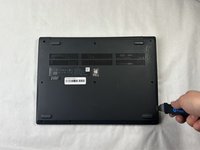
  1. Lenovo V14-ADA Back Panel Replacement, Back Panel: 步骤 1 中的图像 1,1
    • Turn off the laptop.

    • Disconnect the charging cable from the laptop.

    • Failure to unplug the cable could result in electric shock.

    • Flip the laptop upside down.

  2. Lenovo V14-ADA Back Panel Replacement: 步骤 2 中的图像 1,1
    • Remove all ten 5 mm screws from the back panel using a JIS #0 screwdriver.

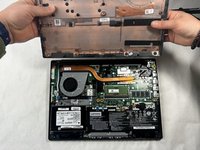
  3. Lenovo V14-ADA Back Panel Replacement: 步骤 3 中的图像 1,2 Lenovo V14-ADA Back Panel Replacement: 步骤 3 中的图像 2,2
    • Place the Jimmy in the small crack between the back panel and the keyboard and push down.

    • Repeat this until the panel pops off.

结论

To reassemble your device, follow these instructions in reverse order.

Kristen Gismondi

于11/12/14注册

103,257 声望

创作了266篇指南

团队

iFixit iFixit 的会员

Staff

124 名成员

创作了24,166篇指南

0指南评论

添加评论

浏览统计数据:

过去 24 小时: 0

过去 7 天: 6

过去 30 天: 22

总计 342