简介
If your Lenovo A285 ThinkPad appears to have slow or unresponsive performance, there may be a problem with the SSD card. Before getting into the replacement guide, take a look at our troubleshooting page for other possible solutions. Before you begin the replacement, make sure the device is entirely powered off and not connected to any power sources.
你所需要的
-
-
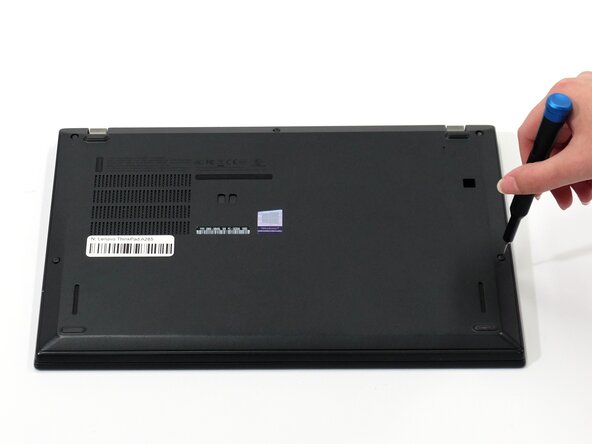
Flip your laptop over so the bottom panel is facing up.
-
Use a Phillips #0 to loosen the 5 screws holding the back panel to the laptop.
-
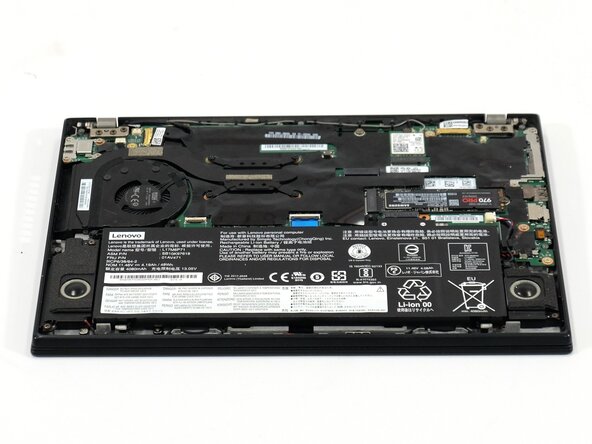
Lift the bottom of the panel to separate the back panel away from the device.
-
Remove the back panel.
-
-
-
-
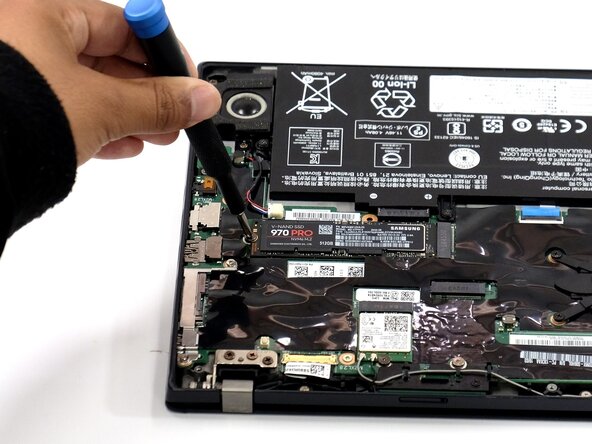
Use a Phillips #0 screwdriver to remove the 3 mm screw that secures the SSD to the motherboard.
-
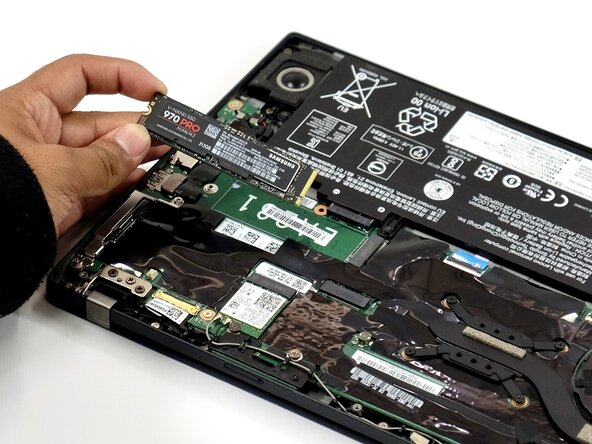
Carefully slide the SSD card from its socket to remove it.
-





To reassemble your device, follow these instructions in reverse order. Take your e-waste to an R2 or e-Stewards certified recycler.



团队

Linn Benton Community College, Team 1-4, Karnes Spring 2025 Linn Benton Community College, Team 1-4, Karnes Spring 2025 的会员
LBCC-KARNES-S25S1G4
4 名成员
创作了6篇指南
