跳转到主内容
加入维修社区 - 创建账户

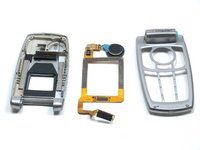
LG L1200 External Housing Replacement

你所需要的

    1. LG L1200 External Housing Replacement, Inner LCD Screen: 步骤 1 中的图像 1,1
      • Make sure you remove the battery by lifting the tab on the back of the phone before opening the case.

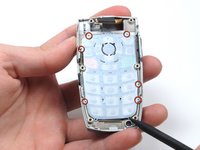
      • Flip open the phone and locate the four screw covers.

      询问修复机器人
      添加评论

    2. LG L1200 External Housing Replacement: 步骤 2 中的图像 1,1
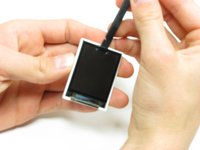
      • Remove all four screw covers by using an IPod opening tool. They should come off relatively easy.

      询问修复机器人
      添加评论

    3. LG L1200 External Housing Replacement: 步骤 3 中的图像 1,1
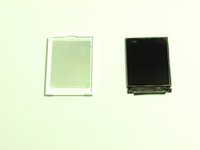
      • Using a T6 Torx screwdriver, remove all four screws.

      询问修复机器人

      添加评论

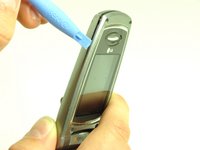
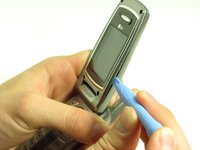
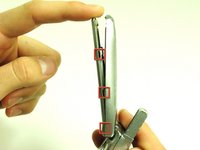
    4. LG L1200 External Housing Replacement: 步骤 4 中的图像 1,3 LG L1200 External Housing Replacement: 步骤 4 中的图像 2,3 LG L1200 External Housing Replacement: 步骤 4 中的图像 3,3
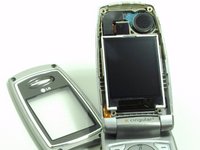
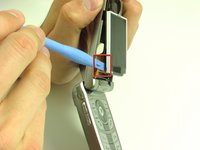
      • Once the screws are removed, use an IPod opening tool to separate the front cover from the inner screen cover.

      • Run the Ipod opening tool down both sides,disconnecting the tabs that hold the covers together.

      询问修复机器人

      添加评论

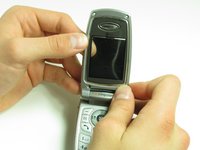
    5. LG L1200 External Housing Replacement: 步骤 5 中的图像 1,2 LG L1200 External Housing Replacement: 步骤 5 中的图像 2,2
      • Pull the inner screen cover towards you and up in order to separate it from the front cover.

      询问修复机器人

      添加评论

    6. LG L1200 External Housing Replacement: 步骤 6 中的图像 1,1
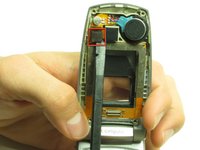
      • Remove the tape from the bottom of the LCD screen.

      询问修复机器人
      添加评论

    7. LG L1200 External Housing Replacement: 步骤 7 中的图像 1,3 LG L1200 External Housing Replacement: 步骤 7 中的图像 2,3 LG L1200 External Housing Replacement: 步骤 7 中的图像 3,3
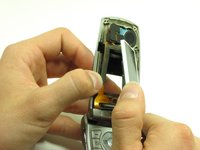
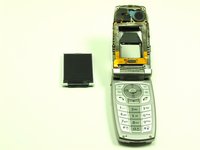
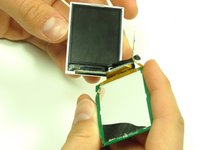
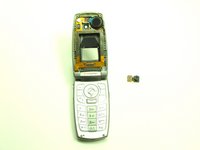
      • Carefully lift the LCD screen and peel it from the gold ribbon. The sticky connection runs all the way around the LCD screen.

      询问修复机器人
      添加评论

    8. LG L1200 External Housing Replacement: 步骤 8 中的图像 1,3 LG L1200 External Housing Replacement: 步骤 8 中的图像 2,3 LG L1200 External Housing Replacement: 步骤 8 中的图像 3,3
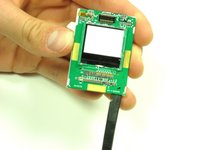
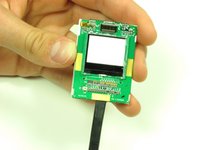
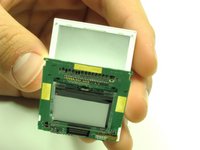
      • Flip the screen over so that you can see the outer LCD screen and the circuit board.

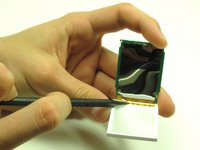
      • Insert spudger in the bottom right corner.

      • Lift up and move the spudger across the bottom.

      • The third photo is rotated 180 degrees.

      询问修复机器人

      添加评论

    9. LG L1200 External Housing Replacement: 步骤 9 中的图像 1,2 LG L1200 External Housing Replacement: 步骤 9 中的图像 2,2
      • Use the pointy side of the spudger to peel off the interior tape.

      • Flip the assembly over and peel the circuit board from the screen.

      询问修复机器人

      添加评论

    10. LG L1200 External Housing Replacement: 步骤 10 中的图像 1,2 LG L1200 External Housing Replacement: 步骤 10 中的图像 2,2
      • Use the spudger to remove the LCD screen from its backing.

      询问修复机器人

      添加评论

    1. LG L1200 External Housing Replacement, Camera: 步骤 11 中的图像 1,1
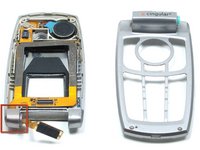
      • Carefully slide the spudger behind the main ribbon in order to separate it from the inside cover of the phone.

      询问修复机器人

      添加评论

    2. LG L1200 External Housing Replacement: 步骤 12 中的图像 1,2 LG L1200 External Housing Replacement: 步骤 12 中的图像 2,2
      • Use a spudger to pop off the camera ribbon from the main ribbon. The camera component should separate entirely.

      询问修复机器人

      添加评论

    1. LG L1200 External Housing Replacement, Logic Board: 步骤 13 中的图像 1,1
      • Make sure you remove the battery by lifting the tab on the back of the phone before opening the case.

      • Poke out rubber covers using a spudger or pointy object, such as a thumb tack.

      询问修复机器人

      添加评论

    2. LG L1200 External Housing Replacement: 步骤 14 中的图像 1,1
      • Use a T6 torx screwdriver to unscrew the 6 screws that hold the back casing on.

      询问修复机器人

      添加评论

    3. LG L1200 External Housing Replacement: 步骤 15 中的图像 1,1
      • Use IPod opening tool to separate back housing.

      • There are two tabs located on either side of the phone.

      询问修复机器人

      添加评论

    4. LG L1200 External Housing Replacement: 步骤 16 中的图像 1,1
      • Separate the back housing from the phone.

      • Be careful not to rip out the wire (highlighted in yellow) when separating the back housing.

      询问修复机器人

      添加评论

    5. LG L1200 External Housing Replacement: 步骤 17 中的图像 1,1
      • Use a spudger to disconnect antenna wire.

      询问修复机器人

      添加评论

    6. LG L1200 External Housing Replacement: 步骤 18 中的图像 1,1
      • Use the IPod opening tool to pop out the logic board.

      询问修复机器人

      添加评论

    7. LG L1200 External Housing Replacement: 步骤 19 中的图像 1,1
      • Use the IPod opening tool to disconnect the main ribbon.

      询问修复机器人

      添加评论

    8. LG L1200 External Housing Replacement: 步骤 20 中的图像 1,1
      • Once the ribbon is detached, remove the logic board and replace if necessary.

      询问修复机器人

      添加评论

    1. LG L1200 External Housing Replacement, Keypad: 步骤 21 中的图像 1,1
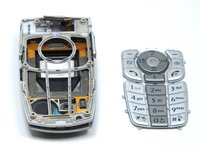
      • The back of the keypad is shown here, next to the logic board (the logic board is turned over to expose the buttons).

      询问修复机器人

      添加评论

    2. LG L1200 External Housing Replacement: 步骤 22 中的图像 1,2 LG L1200 External Housing Replacement: 步骤 22 中的图像 2,2
      • Using a spudger, lift the keypad off of the tabs.

      询问修复机器人

      添加评论

    1. LG L1200 External Housing Replacement, External Housing: 步骤 23 中的图像 1,1
      • Wedge a spudger or another harder prying tool in the connection between the top cover and the bottom cover on the right side.

      • Use a large amount of force to push the top cover off the bottom cover's blue extrusion.

      • Too much force may break the plastic of the top cover

      • When separating the top cover from the bottom cover, be careful not to tear the ribbon as you pull it out from the hinge.

      询问修复机器人

      添加评论

    2. LG L1200 External Housing Replacement: 步骤 24 中的图像 1,2 LG L1200 External Housing Replacement: 步骤 24 中的图像 2,2
      • Slide the ribbon out of the slot in the joint on the left side.

      • Pull the ribbon out of the top cover with your hand.

      • Once the ribbon is removed, you can replace the covers.

      询问修复机器人

      添加评论

结论

To reassemble your device, follow these instructions in reverse order.

取消:我没有完成这个指南。

团队

Cal Poly, Team 6-14, Maness Spring 2010 Cal Poly, Team 6-14, Maness Spring 2010 的会员

CPSU-MANESS-S10S6G14

4 名成员

创作了48篇指南

0指南评论

添加评论

浏览统计数据:

过去 24 小时: 0

过去 7 天: 8

过去 30 天: 43

总计 1,547