跳转到主内容
加入维修社区 - 创建账户

LG G Pad 10.1 Speaker Replacement

你所需要的

  1. LG G Pad 10.1 Speaker Replacement, Rear Case: 步骤 1 中的图像 1,1
    • To remove the back panel of the device, start by attempting to fit the plastic opening tool in the crease between the screen and the back panel of the tablet.

    • Try opening picks if the case is not flexing enough, or if it is already cracked to prevent further damage.

    • You can use your hands to push against the corners of the device to attempt to make the gap larger for your plastic opening tool to fit in.

    • If you are replacing your screen because it is damaged, it may be useful to pick away at some of the glass to expose the clips in the edges of the plastic.

    • Insert the corners of your plastic opening tool into the slots that are on the very outside edge of your device to start disconnecting the panel.

    • On some models, there is a vertical strip of adhesive between the battery and the back cover on the left side of the Verizon logo. Be careful not to damage the battery when separating the adhesive!

    询问修复机器人

    添加评论

  2. LG G Pad 10.1 Speaker Replacement: 步骤 2 中的图像 1,1
    • Once the edge of your device's panel is separate from the screen, continue moving around the outside of the device while continuing to pry the two pieces apart from each other.

    询问修复机器人

    添加评论

  3. LG G Pad 10.1 Speaker Replacement: 步骤 3 中的图像 1,1
    • Insert another plastic opening tool (or a similar tool) between the screen and the back panel on the opposite side of the device to hold it open.

    询问修复机器人

    添加评论

  4. LG G Pad 10.1 Speaker Replacement: 步骤 4 中的图像 1,1
    • Disconnect the battery by inserting the point of a spudger underneath the white tabs on either side of the connector and gently pry up.

    询问修复机器人

    添加评论

  5. LG G Pad 10.1 Speaker Replacement, Motherboard: 步骤 5 中的图像 1,1
    • Remove the five 2 mm Phillips #000 screws securing the motherboard.

    • The silver EMI shield may come off during this step. Just set it aside until reassembly.

    询问修复机器人

    添加评论

  6. LG G Pad 10.1 Speaker Replacement: 步骤 6 中的图像 1,1
    • Remove the two 5 mm Phillips #000 securing the motherboard,

    询问修复机器人

    添加评论

  7. LG G Pad 10.1 Speaker Replacement: 步骤 7 中的图像 1,1
    • Disconnect the cable from the battery to the motherboard by grabbing the cable and pulling upwards.

    询问修复机器人

    添加评论

  8. LG G Pad 10.1 Speaker Replacement: 步骤 8 中的图像 1,2 LG G Pad 10.1 Speaker Replacement: 步骤 8 中的图像 2,2
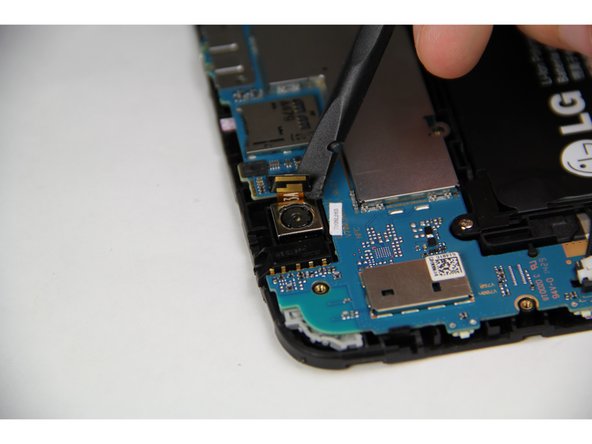
    • Using the spudger, pry up the connector on the motherboard from the back camera to disconnect it.

    询问修复机器人

    添加评论

  9. LG G Pad 10.1 Speaker Replacement: 步骤 9 中的图像 1,1
    • Then move to the front camera towards the end of the motherboard and disconnect that by using the spudger to pull up on the clip.

    询问修复机器人

    添加评论

  10. LG G Pad 10.1 Speaker Replacement: 步骤 10 中的图像 1,1
    • Now that all of the wires and screws are disconnected, use the spudger or a prying tool on the bottom corner of the motherboard to release it from one of the clips holding it in place.

    询问修复机器人

    添加评论

  11. LG G Pad 10.1 Speaker Replacement: 步骤 11 中的图像 1,1
    • Once the corner is removed, repeat the same action at the far end of the motherboard to release the second clip.

    询问修复机器人

    添加评论

  12. LG G Pad 10.1 Speaker Replacement, Speaker: 步骤 12 中的图像 1,1
    • Remove the single 4 mm Phillips #000 screw securing the speaker.

    询问修复机器人

    添加评论

  13. LG G Pad 10.1 Speaker Replacement: 步骤 13 中的图像 1,1
    在这个步骤中使用的工具:
    Tweezers
    $4.99
    • Remove the protective tape that is covering the speaker connections to the device by pulling upwards with either tweezers or your hands.

    询问修复机器人

    添加评论

  14. LG G Pad 10.1 Speaker Replacement: 步骤 14 中的图像 1,2 LG G Pad 10.1 Speaker Replacement: 步骤 14 中的图像 2,2
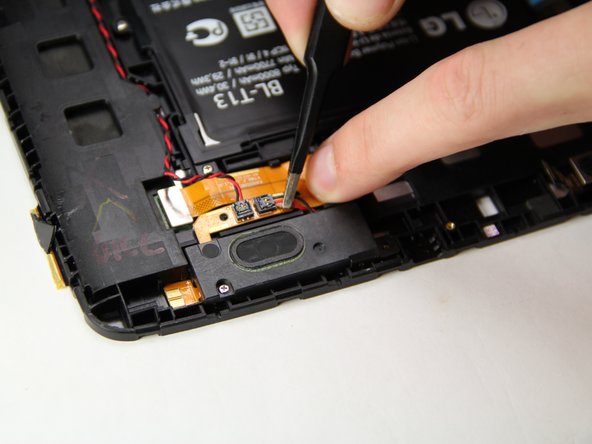
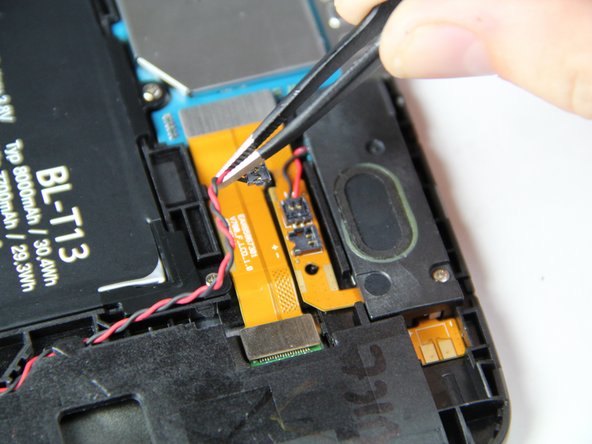
    • While holding the orange ribbon cable in place with your finger, grab the wires and pull upwards to disconnect the speaker from the device.

    询问修复机器人

    添加评论

  15. LG G Pad 10.1 Speaker Replacement: 步骤 15 中的图像 1,1
    • Using either the prying tool or your hands, pull the speaker to remove it from the tablet.

    询问修复机器人

    添加评论

  16. LG G Pad 10.1 Speaker Replacement: 步骤 16 中的图像 1,1
    • Remove the two 4 mm Phillips #000 screws.

    询问修复机器人

    添加评论

  17. LG G Pad 10.1 Speaker Replacement: 步骤 17 中的图像 1,1
    • Once the screws are removed, pull the speaker up with either the tweezers or plastic opening tool.

    询问修复机器人

    添加评论

  18. LG G Pad 10.1 Speaker Replacement: 步骤 18 中的图像 1,1
    • If you have been following steps to remove both speakers, skip this step.

    • Remove the protective tape that is covering the speaker connections to the device by pulling upwards with either tweezers or your hands.

    询问修复机器人

    添加评论

  19. LG G Pad 10.1 Speaker Replacement: 步骤 19 中的图像 1,2 LG G Pad 10.1 Speaker Replacement: 步骤 19 中的图像 2,2
    • Trace the red and black wire down the side of the device while sliding it out from under the small black clips as you work your way towards the end of the cable.

    • While holding the orange ribbon cable in place with your finger, grab the wires and pull upwards to disconnect the speaker from the device.

    询问修复机器人

    添加评论

结论

To reassemble your device, follow these instructions in reverse order.

取消:我没有完成这个指南。

另外一个人完成了本指南。

团队

USF Tampa, Team 15-1, Blackwell Fall 2015 USF Tampa, Team 15-1, Blackwell Fall 2015 的会员

USFT-BLACKWELL-F15S15G1

4 名成员

创作了12篇指南

0指南评论

添加评论

浏览统计数据:

过去 24 小时: 0

过去 7 天: 1

过去 30 天: 21

总计 1,368