跳转到主内容

JVC MP-XP7210D RAM Replacement

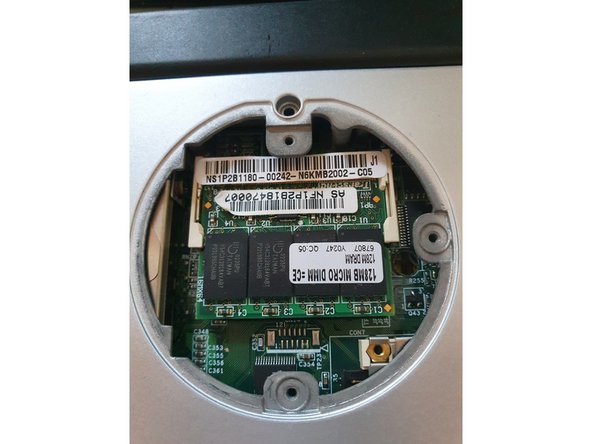
  1. JVC MP-XP7210D RAM Replacement, RAM: 步骤 1 中的图像 1,3 JVC MP-XP7210D RAM Replacement, RAM: 步骤 1 中的图像 2,3 JVC MP-XP7210D RAM Replacement, RAM: 步骤 1 中的图像 3,3
    • Remove the screws of the backplate.

    • See part 2

    • Remove the battery after the screws are removed.

  2. JVC MP-XP7210D RAM Replacement: 步骤 2 中的图像 1,3 JVC MP-XP7210D RAM Replacement: 步骤 2 中的图像 2,3 JVC MP-XP7210D RAM Replacement: 步骤 2 中的图像 3,3
    • Push and slide to the right.

    • There are 2 locking lugs.

  3. JVC MP-XP7210D RAM Replacement, Remove DIMM: 步骤 3 中的图像 1,3 JVC MP-XP7210D RAM Replacement, Remove DIMM: 步骤 3 中的图像 2,3 JVC MP-XP7210D RAM Replacement, Remove DIMM: 步骤 3 中的图像 3,3
    • Push both locking lugs to the sides.

    • Pull it out.

    • 128 MB (max. 256MB) PC133

结论

To reassemble your device, follow these instructions in reverse order.

Alex Barblexi

于03/12/19注册

318 声望

创作了3篇指南

0指南评论

添加评论

浏览统计数据:

过去 24 小时: 0

过去 7 天: 0

过去 30 天: 1

总计 85