跳转到主内容
加入维修社区 - 创建账户

JVC Adixxion GC-XA1BU Power & Record Button Board Replacement

你所需要的

  1. JVC Adixxion GC-XA1BU Power & Record Button Board Replacement, Battery: 步骤 1 中的图像 1,1
    • Find the side of the camera with the black switch shown.

  2. JVC Adixxion GC-XA1BU Power & Record Button Board Replacement: 步骤 2 中的图像 1,1
    • Push down on the black switch.

  3. JVC Adixxion GC-XA1BU Power & Record Button Board Replacement: 步骤 3 中的图像 1,1
    • Slide the battery cover back while pushing down on the black switch.

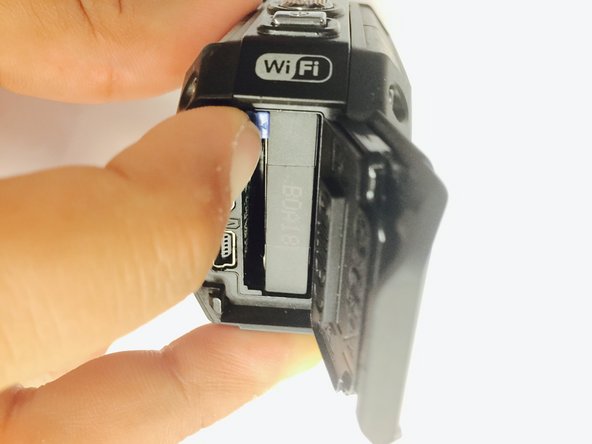
  4. JVC Adixxion GC-XA1BU Power & Record Button Board Replacement: 步骤 4 中的图像 1,2 JVC Adixxion GC-XA1BU Power & Record Button Board Replacement: 步骤 4 中的图像 2,2
    • Open the battery compartment and push the blue battery release switch.

  5. JVC Adixxion GC-XA1BU Power & Record Button Board Replacement: 步骤 5 中的图像 1,1
    • Remove the battery from the camera.

  6. JVC Adixxion GC-XA1BU Power & Record Button Board Replacement, Battery Cover: 步骤 6 中的图像 1,1
    • Remove the two Phillips screws (4mm x 3mm) using the Phillips #00 screwdriver.

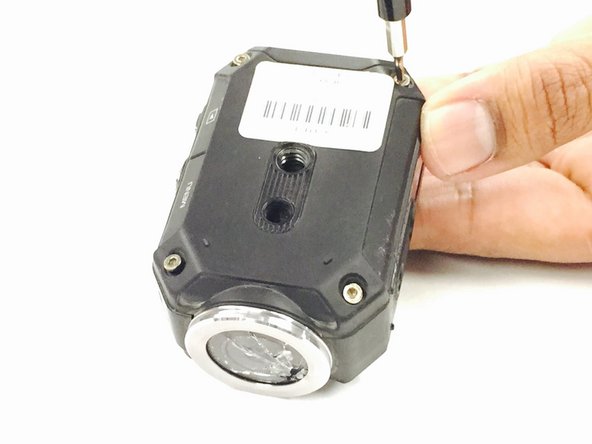
  7. JVC Adixxion GC-XA1BU Power & Record Button Board Replacement, LCD Cover: 步骤 7 中的图像 1,2 JVC Adixxion GC-XA1BU Power & Record Button Board Replacement, LCD Cover: 步骤 7 中的图像 2,2
    • Remove the 8 screws (5mm x 4mm) from the corners of both the front and back of the camera (4 screws on each side) using the T6 Torx screwdriver.

  8. JVC Adixxion GC-XA1BU Power & Record Button Board Replacement: 步骤 8 中的图像 1,1
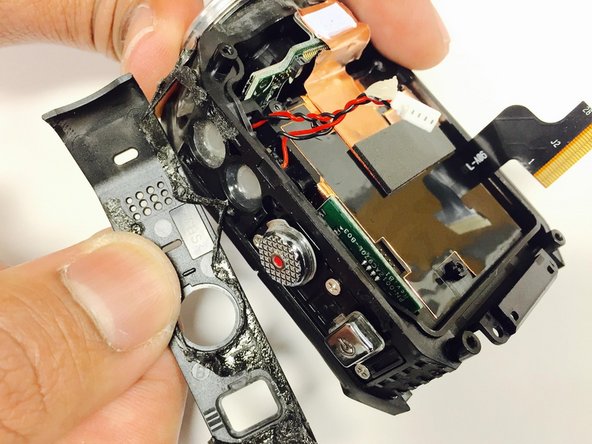
    • Carefully open the camera as shown and gently peel off the black cover tape.

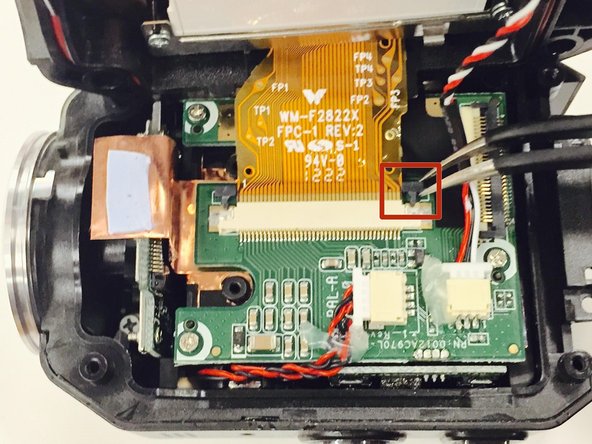
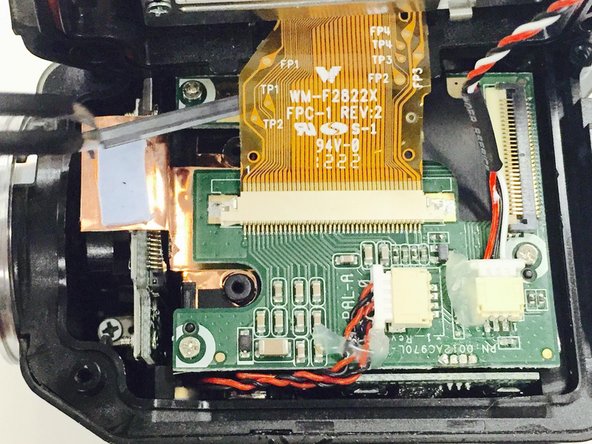
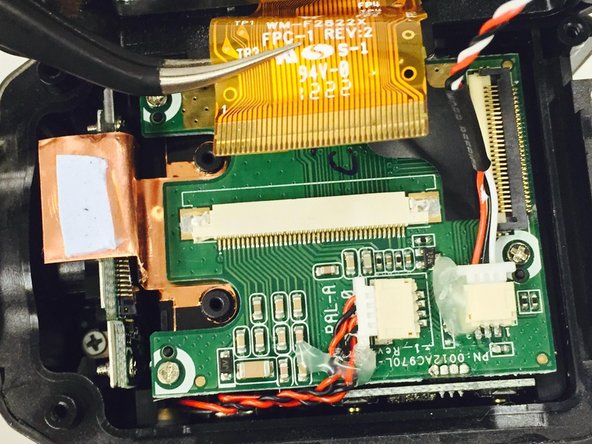
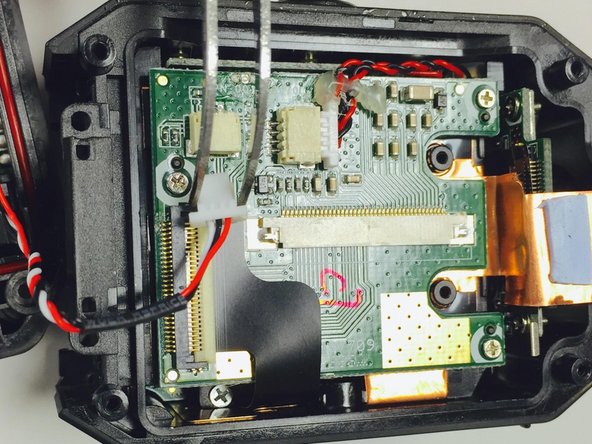
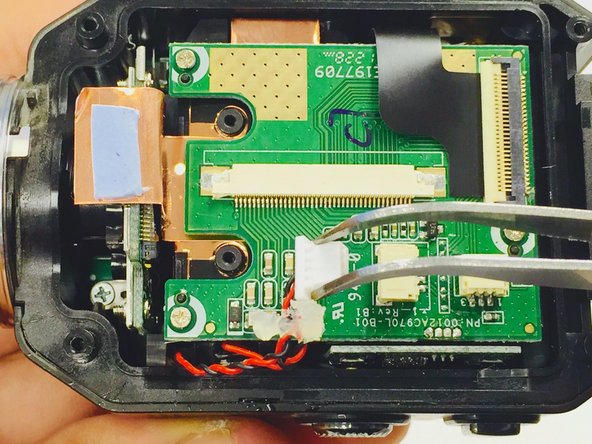
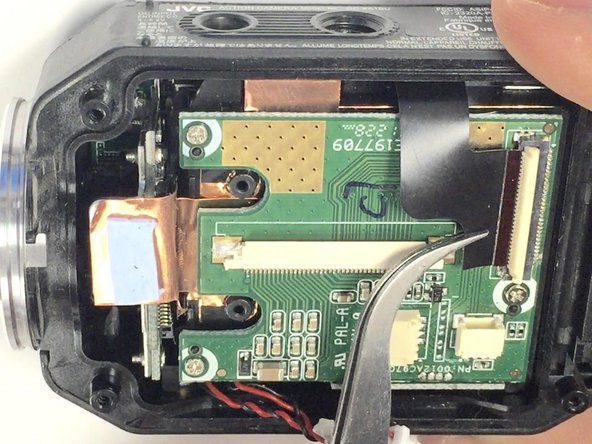
  9. JVC Adixxion GC-XA1BU Power & Record Button Board Replacement: 步骤 9 中的图像 1,3 JVC Adixxion GC-XA1BU Power & Record Button Board Replacement: 步骤 9 中的图像 2,3 JVC Adixxion GC-XA1BU Power & Record Button Board Replacement: 步骤 9 中的图像 3,3
    • Carefully lift up and remove the cable ribbon clip using the tweezers.

  10. JVC Adixxion GC-XA1BU Power & Record Button Board Replacement: 步骤 10 中的图像 1,2 JVC Adixxion GC-XA1BU Power & Record Button Board Replacement: 步骤 10 中的图像 2,2
    • Carefully grasp and remove the ribbon cable using the tweezers.

  11. JVC Adixxion GC-XA1BU Power & Record Button Board Replacement: 步骤 11 中的图像 1,1
    • Turn the camera as shown and carefully remove the glue from the connector.

  12. JVC Adixxion GC-XA1BU Power & Record Button Board Replacement: 步骤 12 中的图像 1,2 JVC Adixxion GC-XA1BU Power & Record Button Board Replacement: 步骤 12 中的图像 2,2
    • Carefully pull the white clip out of the casing using the tweezers.

  13. JVC Adixxion GC-XA1BU Power & Record Button Board Replacement, Battery Housing: 步骤 13 中的图像 1,2 JVC Adixxion GC-XA1BU Power & Record Button Board Replacement, Battery Housing: 步骤 13 中的图像 2,2
    • Carefully peel off the glue holding the red and black braided wire down to the circuit board.

    • Then remove the connector by gently pulling it out of its casing.

    • You will want to save this glue as it may come in handy when re-assembling your device.

  14. JVC Adixxion GC-XA1BU Power & Record Button Board Replacement: 步骤 14 中的图像 1,2 JVC Adixxion GC-XA1BU Power & Record Button Board Replacement: 步骤 14 中的图像 2,2
    • Lift up the white ribbon clip and remove the black ribbon by gently pulling it away from the white clip.

  15. JVC Adixxion GC-XA1BU Power & Record Button Board Replacement: 步骤 15 中的图像 1,1
    • Remove the the three Phillips screws (3mm headsize x 2mm length) from the circuit board.

    • After you remove the screws, you can then remove the green circuit board by lifting it up out of the device case.

    • You may want to use the plastic opening tool to get start lifting the circuit board.

  16. JVC Adixxion GC-XA1BU Power & Record Button Board Replacement: 步骤 16 中的图像 1,1
    • Once the circuit board is removed, you will want to remove the Phillips screw (3mm headsize x 2 mm length) near the ribbon cable.

    • ONLY REMOVE THIS ONE SCREW.

  17. JVC Adixxion GC-XA1BU Power & Record Button Board Replacement: 步骤 17 中的图像 1,2 JVC Adixxion GC-XA1BU Power & Record Button Board Replacement: 步骤 17 中的图像 2,2
    • Use the plastic opening tool to gently remove the top cover from the camera.

    • It is glued on, so you may need to work at it to get it to come off.

  18. JVC Adixxion GC-XA1BU Power & Record Button Board Replacement: 步骤 18 中的图像 1,1
    • Once the cover has been removed, you will want to remove the three Phillips screws (2mm headsize x 2mm length) that are underneath.

  19. JVC Adixxion GC-XA1BU Power & Record Button Board Replacement: 步骤 19 中的图像 1,2 JVC Adixxion GC-XA1BU Power & Record Button Board Replacement: 步骤 19 中的图像 2,2
    在这个步骤中使用的工具:
    Tweezers
    $4.99
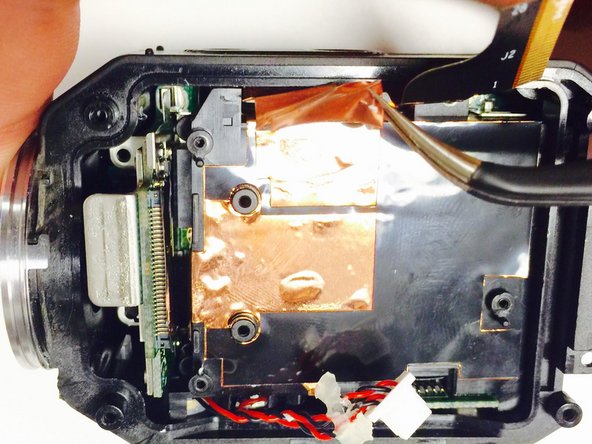
    • Carefully remove both the top and bottom copper strips by gently pulling them off with the tweezers.

  20. JVC Adixxion GC-XA1BU Power & Record Button Board Replacement: 步骤 20 中的图像 1,2 JVC Adixxion GC-XA1BU Power & Record Button Board Replacement: 步骤 20 中的图像 2,2
    • Now you should be able to gently remove the battery housing out of the device.

    • If you are having difficulty getting the battery housing to come out, you may want to use the plastic opening tool to help get it started.

  21. JVC Adixxion GC-XA1BU Power & Record Button Board Replacement, Power & Record Button Board: 步骤 21 中的图像 1,3 JVC Adixxion GC-XA1BU Power & Record Button Board Replacement, Power & Record Button Board: 步骤 21 中的图像 2,3 JVC Adixxion GC-XA1BU Power & Record Button Board Replacement, Power & Record Button Board: 步骤 21 中的图像 3,3
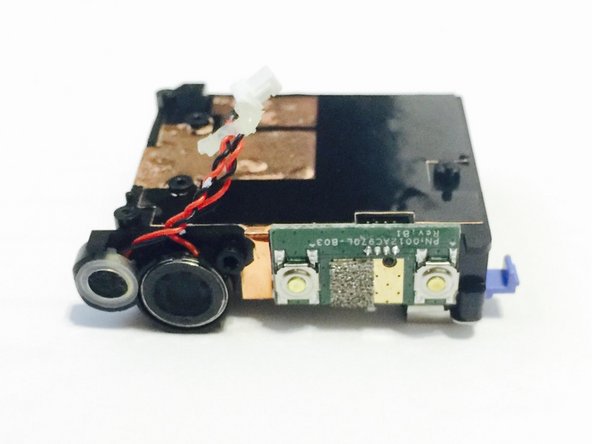
    • The power and record buttons are glued to the battery housing, so use the plastic opening tool to gently pry off and remove the buttons.

结论

To reassemble your device, follow these instructions in reverse order.

另外一个人完成了本指南。

团队

USF Tampa, Team 1-2, Tanski Winter 2015 USF Tampa, Team 1-2, Tanski Winter 2015 的会员

USFT-TANSKI-W15S1G2

4 名成员

创作了8篇指南

0指南评论

添加评论

浏览统计数据:

过去 24 小时: 0

过去 7 天: 5

过去 30 天: 20

总计 926