跳转到主内容

How to Repair the Buttons on a Logitech Pebble Mouse

你所需要的

  1. How to Repair the Buttons on a Logitech Pebble Mouse, How to Repair the Buttons on a Logitech Pebble Mouse: 步骤 1 中的图像 1,3 How to Repair the Buttons on a Logitech Pebble Mouse, How to Repair the Buttons on a Logitech Pebble Mouse: 步骤 1 中的图像 2,3 How to Repair the Buttons on a Logitech Pebble Mouse, How to Repair the Buttons on a Logitech Pebble Mouse: 步骤 1 中的图像 3,3
    • Use your hands to remove the magnetic top panel of the mouse.

  2. How to Repair the Buttons on a Logitech Pebble Mouse: 步骤 2 中的图像 1,3 How to Repair the Buttons on a Logitech Pebble Mouse: 步骤 2 中的图像 2,3 How to Repair the Buttons on a Logitech Pebble Mouse: 步骤 2 中的图像 3,3
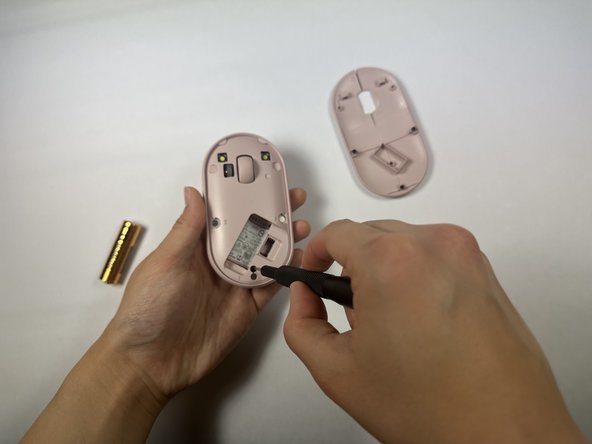
    • Remove the USB adaptor in the small rectangular hole on the lower right corner.

    • Remove the battery.

  3. How to Repair the Buttons on a Logitech Pebble Mouse: 步骤 3 中的图像 1,2 How to Repair the Buttons on a Logitech Pebble Mouse: 步骤 3 中的图像 2,2
    • Use a Phillips #000 screwdriver to remove one screw holding the inner panel in place.

  4. How to Repair the Buttons on a Logitech Pebble Mouse: 步骤 4 中的图像 1,3 How to Repair the Buttons on a Logitech Pebble Mouse: 步骤 4 中的图像 2,3 How to Repair the Buttons on a Logitech Pebble Mouse: 步骤 4 中的图像 3,3
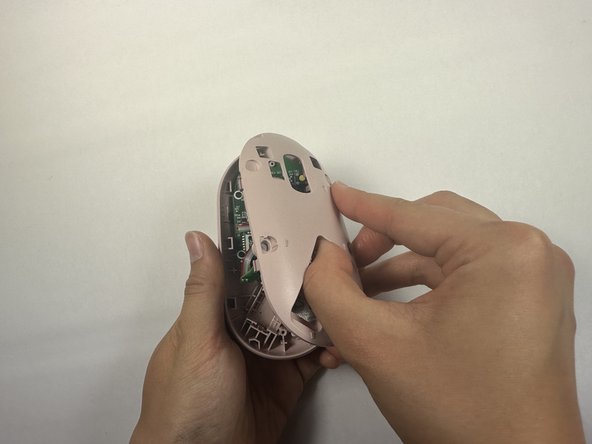
    • Remove the the inner panel.

    • This may take a little bit of effort but it should come off fairly easily.

    • You can use the battery socket as leverage to remove the panel. To avoid breaking the panel, be gentle but firm.

  5. How to Repair the Buttons on a Logitech Pebble Mouse: 步骤 5 中的图像 1,1
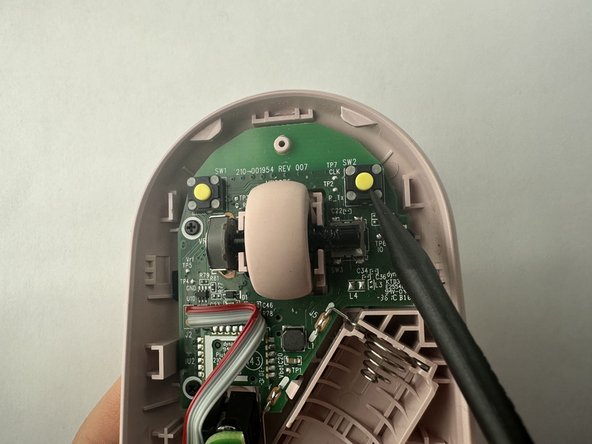
    • Use a fine-tipped object or a Q-tip and dip it in a small amount of oil.

  6. How to Repair the Buttons on a Logitech Pebble Mouse: 步骤 6 中的图像 1,3 How to Repair the Buttons on a Logitech Pebble Mouse: 步骤 6 中的图像 2,3 How to Repair the Buttons on a Logitech Pebble Mouse: 步骤 6 中的图像 3,3
    • Gently wipe the metal axle where the scroll wheel is mounted with a small amount of 3-in-1 oil.

    • Repeat for the left and right click buttons.

结论

To reassemble your device, follow these instructions in reverse order.

4等其他人完成本指南。

Emma Whitmer

于04/19/23注册

205 声望

撰写一个指南

团队

UC Davis, Team 2-6, Morris Spring 2023 UC Davis, Team 2-6, Morris Spring 2023 的会员

UCD-MORRIS-S23S2G6

3 名成员

创作了1篇指南

5指南评论

At first i'm laugh about fixing button with oil, but then i tried it... and it worked like a charm!

Marat - 回复

I didn't even disassemble (unscrew) my pebble. Just applied a drop of mineral oil to the button and it did help a lot! Thanks!

Tomek Luzak - 回复

Hi Emma, Is it fine to use the spray version of wd40 if not what is the difference?

Best

Hakan

Hakan Toptas - 回复

I'm finding the issue with my new Pebble isn't so much that the buttons don't work. It's that they are unreliable because if you don't press near dead center on the button, it doesn't actuate enough to press the microswitch. I feel like this is a design flaw, but maybe this guide will help. On the plus side, at least they built it where it's easy to take apart.

Stephen Speck - 回复

Wow, it worked really well! Although on the first day, there were still some clicking issues. But by the second day, everything seemed fine

Yuriy Z - 回复

添加评论

浏览统计数据:

过去 24 小时: 4

过去 7 天: 33

过去 30 天: 171

总计 4,889