跳转到主内容

How to Open the Rocketfish RF-WHTIB-A Sender

仅作为前提条件
本指南仅提供前提条件!本指南是另一个程序的一部分,不能单独使用。

你所需要的

  1. How to Open the Rocketfish RF-WHTIB-A Sender, How to Open the Rocketfish RF-WHTIB-A Sender: 步骤 1 中的图像 1,1
    • Remove the four rubber tabs from the bottom of the sender.

    • Pull hard to peel off the rubber tabs, as they are attached with adhesive.

  2. How to Open the Rocketfish RF-WHTIB-A Sender: 步骤 2 中的图像 1,1
    • Use a Phillips #1 screwdriver to unscrew the four 12 mm screws on the bottom of the device.

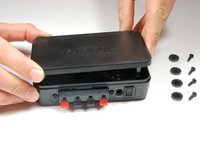
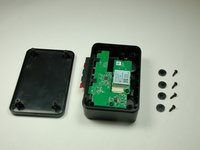
  3. How to Open the Rocketfish RF-WHTIB-A Sender: 步骤 3 中的图像 1,2 How to Open the Rocketfish RF-WHTIB-A Sender: 步骤 3 中的图像 2,2
    • Flip the device over and remove the top casing from the sender.

结论

To reassemble your device, follow these instructions in reverse order.

团队

Baylor, Team 4-2, Williams Spring 2015 Baylor, Team 4-2, Williams Spring 2015 的会员

BU-WILLIAMS-S15S4G2

3 名成员

创作了6篇指南

0指南评论

添加评论

浏览统计数据:

过去 24 小时: 0

过去 7 天: 0

过去 30 天: 0

总计 60