跳转到主内容

How to Fix Sticky Controls on a Logitech RumblePad2

你所需要的

  1. How to Fix Sticky Controls on a Logitech RumblePad2, How to Fix Sticky Controls on a Logitech RumblePad2: 步骤 1 中的图像 1,1
    • Remove the battery pack cover.

    • Remove the batteries.

  2. How to Fix Sticky Controls on a Logitech RumblePad2: 步骤 2 中的图像 1,1
    • Remove the five screws from the back of the controller using the #0 Phillips screwdriver.

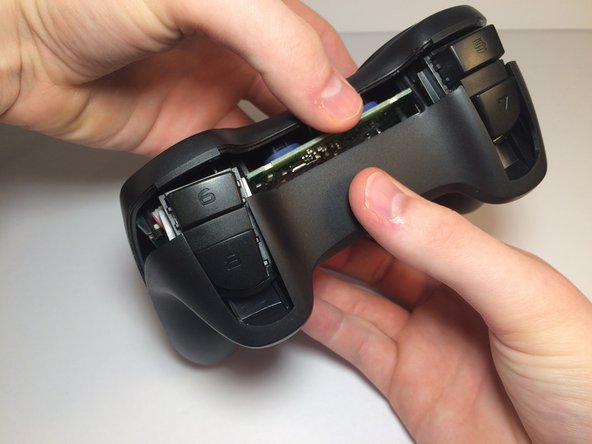
  3. How to Fix Sticky Controls on a Logitech RumblePad2: 步骤 3 中的图像 1,2 How to Fix Sticky Controls on a Logitech RumblePad2: 步骤 3 中的图像 2,2
    • Remove the back panel from the controller.

    • It is easiest to first pry off the panel from the bottom, as shown in the pictures.

    • If using a tool to pry the panel off, do not insert the tool far into the controller. This may damage the motherboard.

  4. How to Fix Sticky Controls on a Logitech RumblePad2: 步骤 4 中的图像 1,1
    • Remove the two screws from the motherboard using the #0 Phillips screwdriver.

  5. How to Fix Sticky Controls on a Logitech RumblePad2: 步骤 5 中的图像 1,2 How to Fix Sticky Controls on a Logitech RumblePad2: 步骤 5 中的图像 2,2
    • Remove the rumble motors from their slots and allow them to hang freely.

    • Remove the motherboard from the controller by lifting up.

  6. How to Fix Sticky Controls on a Logitech RumblePad2: 步骤 6 中的图像 1,1
    • Wipe the outer face of the analog sticks with a wet cotton swab or paper towel.

  7. How to Fix Sticky Controls on a Logitech RumblePad2: 步骤 7 中的图像 1,1
    • Wipe the button pads with a wet cotton swab or paper towel.

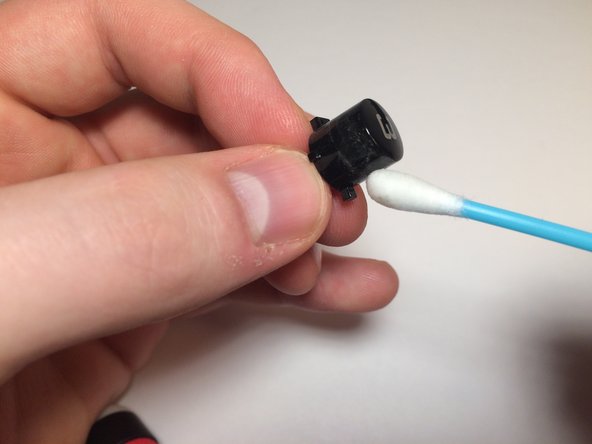
  8. How to Fix Sticky Controls on a Logitech RumblePad2: 步骤 8 中的图像 1,2 How to Fix Sticky Controls on a Logitech RumblePad2: 步骤 8 中的图像 2,2
    • Remove the buttons from their slots by pushing them in from the front.

    • Wipe the buttons with a wet cotton swab or paper towel

结论

After allowing the controller time to dry, reassemble your device by following these instructions in reverse order.

Dan Heckman

于10/05/17注册

101 声望

撰写一个指南

团队

Michigan Tech, Team S3-G11, Galliah Fall 2017 Michigan Tech, Team S3-G11, Galliah Fall 2017 的会员

MTU-GALLIAH-F17S3G11

1 名成员

创作了1篇指南

0指南评论

添加评论

浏览统计数据:

过去 24 小时: 0

过去 7 天: 3

过去 30 天: 14

总计 1,136