跳转到主内容
加入维修社区 - 创建账户

HTC EVO 4G Speaker Replacement

浏览量: 784

浏览统计数据:

过去24小时
5
过去 7 天:
23
过去 30 天:
82
总计
784
评论: 0

暂时还没有人对本指南发表评论。你想做第一个评论的人吗?

Go to guide comments
已完成: 0

暂时还没有人将本指南标记为“已完成”。你会是第一个完成的人吗?

收藏: 0

暂时还没有人收藏(和订阅)本指南。你会是第一个收藏(和订阅)的人吗?

所需时间: 30 - 40 分钟
难度: 困难
更好的介绍

通过完成或修改其开头介绍以改善本指南。

HTC EVO 4G Speaker Replacement

你所需要的

配件

    1. HTC EVO 4G Speaker Replacement, Battery: 步骤 1 中的图像 1,2 HTC EVO 4G Speaker Replacement, Battery: 步骤 1 中的图像 2,2
      • Remove the back case of the phone with a plastic opening tool by placing the tool in the tab on the back of the phone.

      询问修复机器人

      添加评论

    2. HTC EVO 4G Speaker Replacement: 步骤 2 中的图像 1,2 HTC EVO 4G Speaker Replacement: 步骤 2 中的图像 2,2
      • Remove the battery from the phone by carefully lifting it out with your fingers.

      询问修复机器人

      添加评论

    3. HTC EVO 4G Speaker Replacement: 步骤 3 中的图像 1,1
      • Set the battery aside for disposal. You are now ready to insert a new battery.

      询问修复机器人

      添加评论

    1. HTC EVO 4G Speaker Replacement, Speaker: 步骤 4 中的图像 1,1
      • you should remove the six T5 screws holding the Inner frame in place. Be careful not to loose the screws

      询问修复机器人

      添加评论

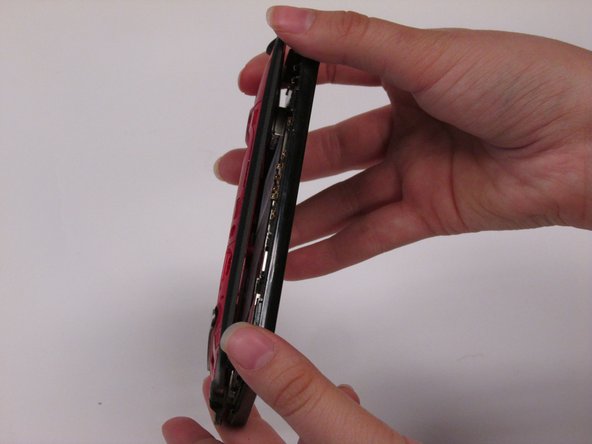
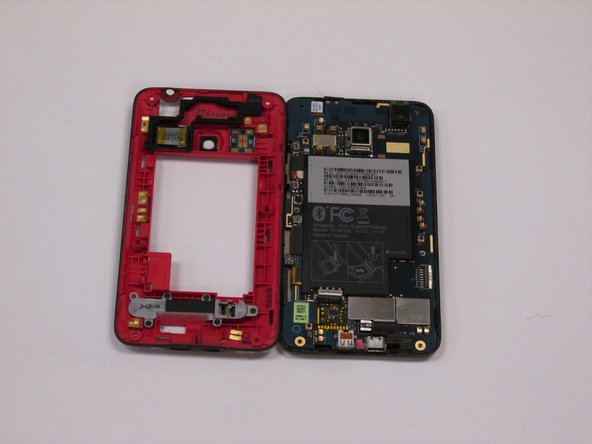
    2. HTC EVO 4G Speaker Replacement: 步骤 5 中的图像 1,3 HTC EVO 4G Speaker Replacement: 步骤 5 中的图像 2,3 HTC EVO 4G Speaker Replacement: 步骤 5 中的图像 3,3
      • Using the plastic opening tool again, gently pry the inner frame apart from the rest of the phone

      • Remove the inner frame from the rest of the phone by lifting it off

      询问修复机器人

      添加评论

    3. HTC EVO 4G Speaker Replacement: 步骤 6 中的图像 1,1
      • use plastic pic to gently pry our the speaker

      • be sure to have your replacement unit ready

      询问修复机器人

      添加评论

结论

To reassemble your device, follow these instructions in reverse order.

取消:我没有完成这个指南。

作者

与

Sage Jurado

于03/13/14注册

1,128 声望

创作了4篇指南

团队

0指南评论

添加评论

浏览统计数据:

过去 24 小时: 5

过去 7 天: 23

过去 30 天: 82

总计 784