跳转到主内容

HP ProBook 430 G6 Basic Disassembly

你所需要的

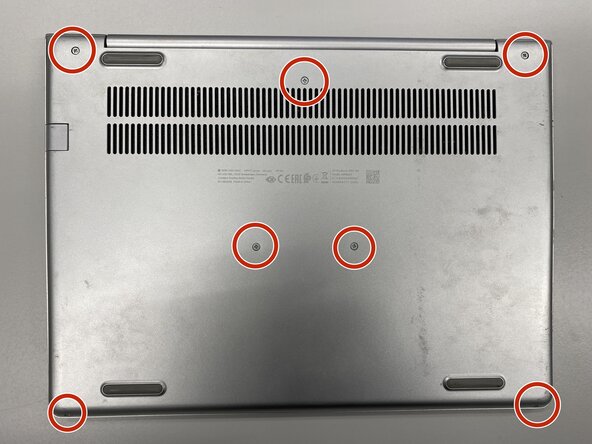
  1. HP ProBook 430 G6 Basic Disassembly, Remove the screws from the base: 步骤 1 中的图像 1,1
    • Turn off the laptop and remove power cable.

    • Flip the laptop upside down.

    • Remove the labeled screws with Phillips #0 screwdriver.

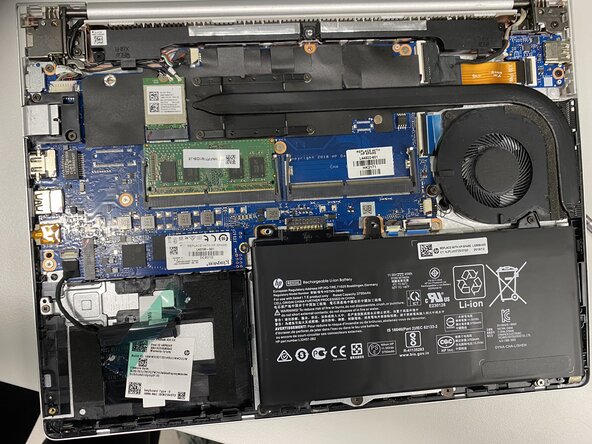
  2. HP ProBook 430 G6 Basic Disassembly, Remove the base: 步骤 2 中的图像 1,1
    • Remove the metal base with iFixit Opening Tool or Opening Picks.

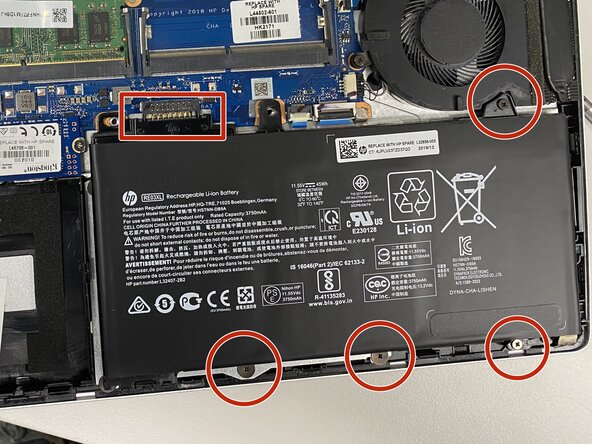
  3. HP ProBook 430 G6 Basic Disassembly, Disconnect the battery: 步骤 3 中的图像 1,1
    • Disconnect the battery by removing the labeled screws and lifting the battery upwards from the box-labeled connector.

    • Battery disconnecting is very important to do before any replacements!

结论

To do some cleaning or replacement operation, you need to disassembly your laptop with this guide.

Hiiri522

于08/10/25注册

563 声望

创作了6篇指南

0指南评论

添加评论

浏览统计数据:

过去 24 小时: 0

过去 7 天: 4

过去 30 天: 25

总计 105