跳转到主内容
加入维修社区 - 创建账户

HP 7 Plus 1302 Power and Volume Button Replacement

你所需要的

    1. HP 7 Plus 1302 Power and Volume Button Replacement, Back Cover: 步骤 1 中的图像 1,1
      • Using the T5 Torx Screwdriver, remove the T5x3mm screws located in all 4 corners.

      • Device should be turned off and unplugged before starting the replacements.

      询问修复机器人

      添加评论

    2. HP 7 Plus 1302 Power and Volume Button Replacement: 步骤 2 中的图像 1,2 HP 7 Plus 1302 Power and Volume Button Replacement: 步骤 2 中的图像 2,2
      • Use the plastic opening tool to push in between the front and the back of the tablet.

      • Slide the plastic opening tool around all 4 sides of the tablet to separate the back cover.

      • Be careful when you are trying to remove the back as it can damage the screen if you force it too much.

      询问修复机器人

      添加评论

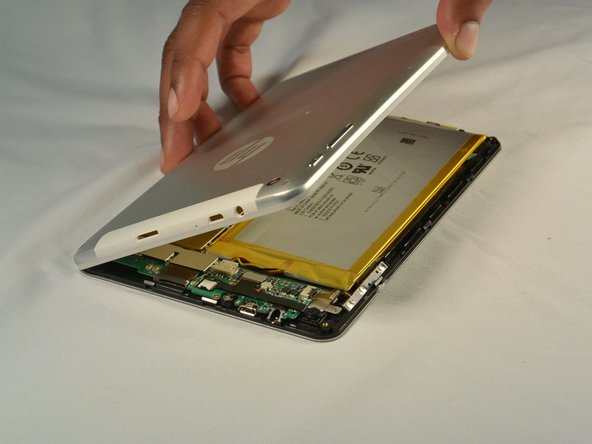
    3. HP 7 Plus 1302 Power and Volume Button Replacement: 步骤 3 中的图像 1,2 HP 7 Plus 1302 Power and Volume Button Replacement: 步骤 3 中的图像 2,2
      • Continue sliding the plastic opening tool around the tablet until all 4 sides are separated from each other.

      • Remove the back cover.

      询问修复机器人

      添加评论

    1. HP 7 Plus 1302 Power and Volume Button Replacement, Power and Volume Button: 步骤 4 中的图像 1,1
      • Locate the power and volume buttons on the right side

      询问修复机器人

      添加评论

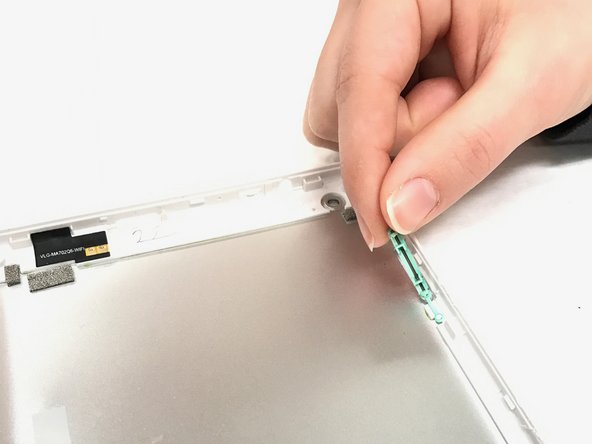
    2. HP 7 Plus 1302 Power and Volume Button Replacement: 步骤 5 中的图像 1,2 HP 7 Plus 1302 Power and Volume Button Replacement: 步骤 5 中的图像 2,2
      • Pop out the power and volume buttons with your hands

      询问修复机器人

      添加评论

结论

To reassemble your device, follow these instructions in reverse order.

取消:我没有完成这个指南。

团队

IUPUI, Team 1-4, Baechle Spring 2017 IUPUI, Team 1-4, Baechle Spring 2017 的会员

IUPUI-BAECHLE-S17S1G4

4 名成员

创作了12篇指南

0指南评论

添加评论

浏览统计数据:

过去 24 小时: 2

过去 7 天: 10

过去 30 天: 31

总计 563