跳转到主内容

HP 15-db0004dx RAM Replacement

你所需要的

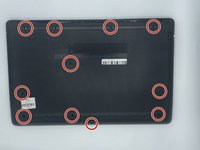
  1. HP 15-db0004dx RAM Replacement, Bottom Case: 步骤 1 中的图像 1,2 HP 15-db0004dx RAM Replacement, Bottom Case: 步骤 1 中的图像 2,2
    • Turn the laptop off and unplug it before starting.

    • Flip your laptop over, face down.

  2. HP 15-db0004dx RAM Replacement: 步骤 2 中的图像 1,1
    • Peel off the two long rubber grips running lengthwise on the laptop.

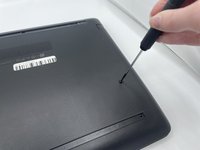
  3. HP 15-db0004dx RAM Replacement: 步骤 3 中的图像 1,2 HP 15-db0004dx RAM Replacement: 步骤 3 中的图像 2,2
    • Using a Phillips #000 screwdriver, remove the eleven 10 mm screws located on the underside of the laptop, that are holding the back panel in place.

  4. HP 15-db0004dx RAM Replacement: 步骤 4 中的图像 1,1
    • Carefully slide the optical drive out of the laptop.

  5. HP 15-db0004dx RAM Replacement: 步骤 5 中的图像 1,1
    • Use a plastic opening tool to separate the back panel from the laptop.

    • For an easier removal, start at the corner and run the tool along the edge of the cover.

    • If you do not have a plastic opening tool, open it carefully using your hands, as shown.

    • Be careful to not bend the back panel, or to not apply too much pressure and force, doing so could cause the panel to break.

  6. HP 15-db0004dx RAM Replacement, RAM: 步骤 6 中的图像 1,1
    • Gently pull apart the two silver arms securing the RAM until it slightly flips up.

    • Pull the RAM directly out of its port.

  7. HP 15-db0004dx RAM Replacement: 步骤 7 中的图像 1,1
    • To put the RAM back into the device. Have the RAM facing you with the four grey boxes towards you. Then carefully slide it under the first grey bar shown circled in the picture and push slightly downwards as it will pop back into place.

结论

To reassemble your device, follow these instructions in reverse order.

giselle

于09/22/22注册

135 声望

撰写一个指南

0指南评论

添加评论

浏览统计数据:

过去 24 小时: 0

过去 7 天: 3

过去 30 天: 11

总计 501