跳转到主内容
加入维修社区 - 创建账户

HP 10 2101 Camera Replacement

浏览量: 673

浏览统计数据:

过去24小时
1
过去 7 天:
10
过去 30 天:
54
总计
673
评论: 0

暂时还没有人对本指南发表评论。你想做第一个评论的人吗?

Go to guide comments
已完成: 0

暂时还没有人将本指南标记为“已完成”。你会是第一个完成的人吗?

收藏: 0

暂时还没有人收藏(和订阅)本指南。你会是第一个收藏(和订阅)的人吗?

所需时间: 10 - 20 分钟
难度: 困难
HP 10 2101 Camera Replacement

The cameras are directly attached to the motherboard through web cam cables. In order to access those cables to remove the cameras, the battery must be removed first. This guide also requires unsoldering the battery connections from the motherboard.

你所需要的

工具

    1. HP 10 2101 Camera Replacement, Back Panel: 步骤 1 中的图像 1,1
      • Identify the SD card port.

      询问修复机器人

      添加评论

    2. HP 10 2101 Camera Replacement: 步骤 2 中的图像 1,1
      • Insert the smallest plastic opening tool into the SD card port. Gently pry until the back panel separates from the screen panel.

      • Do not insert opening tool too far. Avoid making contact with the metal inside the port.

      询问修复机器人

      添加评论

    3. HP 10 2101 Camera Replacement: 步骤 3 中的图像 1,1
      • Slide the opening tool along the seam between the back panel and the screen panel, prying the panels apart as you move around the edges.

      询问修复机器人

      添加评论

    4. HP 10 2101 Camera Replacement: 步骤 4 中的图像 1,1
      • Separate the back panel from the rest of the device.

      询问修复机器人

      添加评论

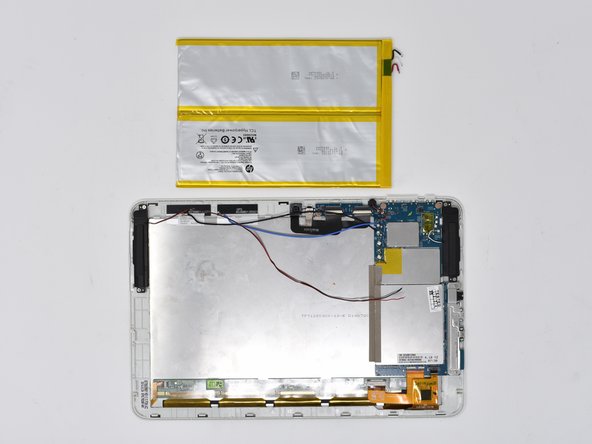
    1. HP 10 2101 Camera Replacement, Battery: 步骤 5 中的图像 1,1
      • Desolder the battery connectors from the motherboard.

      询问修复机器人

      添加评论

    2. HP 10 2101 Camera Replacement: 步骤 6 中的图像 1,1
      • Pull the bright blue-green tabs to remove the battery from the rest of the device.

      • Pulling the tabs may not fully disconnect the battery from the metal display casing.

      询问修复机器人

      添加评论

    3. HP 10 2101 Camera Replacement: 步骤 7 中的图像 1,2 HP 10 2101 Camera Replacement: 步骤 7 中的图像 2,2
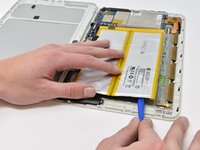
      • If the previous step is unsuccessful, wedge the smallest plastic opening tool between the adhesive and the metal display casing.

      • Wedging may apply unsafe pressure on the battery. Be careful not to puncture the battery.

      询问修复机器人

      添加评论

    1. HP 10 2101 Camera Replacement, Camera: 步骤 8 中的图像 1,1
      • Peel off the metal mesh tape with the plastic opening tool.

      询问修复机器人

      添加评论

    2. HP 10 2101 Camera Replacement: 步骤 9 中的图像 1,1
      • Disconnect the zero insertion force (ZIF) cable. Use the tip of the spudger or your fingernail to flip up the small white locking flap. Then, you can safely pull the cable out.

      • Repeat this process for the second connection port.

      • Be sure to pry up on the hinged flap, not the connector socket.

      询问修复机器人

      添加评论

    3. HP 10 2101 Camera Replacement: 步骤 10 中的图像 1,1
      • Remove the front and back camera.

      询问修复机器人

      添加评论

结论

To reassemble your device, follow these instructions in reverse order.

取消:我没有完成这个指南。

作者

与

Bryce Harmsen

于09/25/18注册

692 声望

创作了5篇指南

0指南评论

添加评论

浏览统计数据:

过去 24 小时: 1

过去 7 天: 10

过去 30 天: 54

总计 673