跳转到主内容
加入维修社区 - 创建账户

Google Pixel 9a Wide Camera Installation

仅作为前提条件
本指南仅提供前提条件!本指南是另一个程序的一部分,不能单独使用。
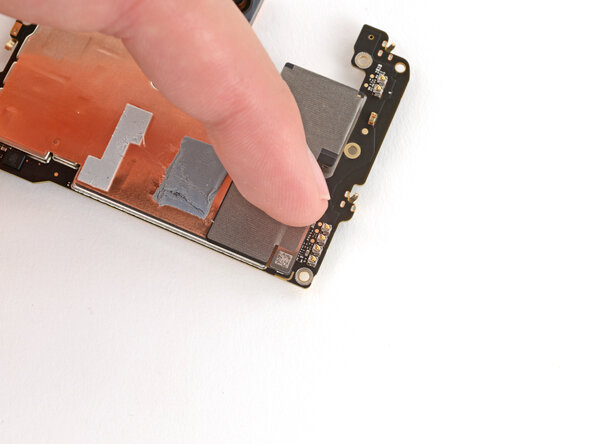
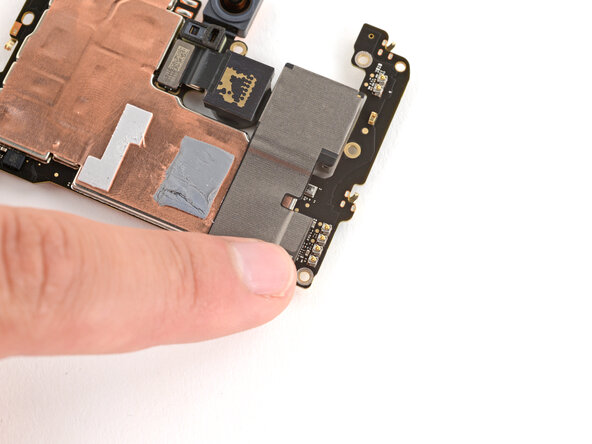
  1. Google Pixel 9a Wide Camera Installation, Install the wide camera: 步骤 1 中的图像 1,3 Google Pixel 9a Wide Camera Installation, Install the wide camera: 步骤 1 中的图像 2,3 Google Pixel 9a Wide Camera Installation, Install the wide camera: 步骤 1 中的图像 3,3
    • Leave any lens caps or liners on the camera for now—they'll protect the lens during reassembly. You'll remove them before installing the back cover.

    • Put the wide camera into place on the logic board, being careful not to smudge the lens.

    • Align the press connector over its socket and press down with your fingertip—first on one of the short sides, then the other—until it clicks into place.

终点

Spencer Day

于09/14/22注册

160,379 声望

创作了1,045篇指南

团队

iFixit iFixit 的会员

Staff

123 名成员

创作了23,996篇指南

0指南评论

添加评论

浏览统计数据:

过去 24 小时: 0

过去 7 天: 0

过去 30 天: 2

总计 43