跳转到主内容

GoPro Hero+ LCD Back Panel Disassembly

仅作为前提条件
本指南仅提供前提条件!本指南是另一个程序的一部分,不能单独使用。

你所需要的

  1. GoPro Hero+ LCD Back Panel Disassembly, Back Panel: 步骤 1 中的图像 1,2 GoPro Hero+ LCD Back Panel Disassembly, Back Panel: 步骤 1 中的图像 2,2
    • Be sure to power off the GoPro before you start disassembly.

    • Pop up and pull back on the clip to remove the screen cover and expose the back panel with the touchscreen.

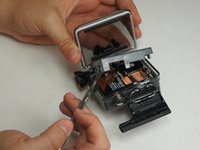
  2. GoPro Hero+ LCD Back Panel Disassembly: 步骤 2 中的图像 1,2 GoPro Hero+ LCD Back Panel Disassembly: 步骤 2 中的图像 2,2
    • Use the metal spudger to pry around the perimeter of the panel.

    • Pry the panel upwards by inserting the metal spudger into the corner crease between the panel and camera shell.

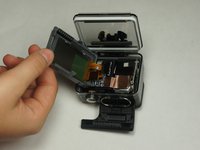
  3. GoPro Hero+ LCD Back Panel Disassembly: 步骤 3 中的图像 1,2 GoPro Hero+ LCD Back Panel Disassembly: 步骤 3 中的图像 2,2
    • Pry around the panel to ensure it is not attached to the device.

    • Move the panel to the side so you can access the internal components.

    • The panel is still attached to the rest of the device with a ribbon cable, so be sure to not tear or damage the cable.

结论

To reassemble your device, follow these instructions in reverse order.

Matthew Tinkey

于08/27/15注册

922 声望

创作了4篇指南

团队

USF Tampa, Team 2-4, Blackwell Fall 2015 USF Tampa, Team 2-4, Blackwell Fall 2015 的会员

USFT-BLACKWELL-F15S2G4

4 名成员

创作了20篇指南

0指南评论

添加评论

浏览统计数据:

过去 24 小时: 0

过去 7 天: 1

过去 30 天: 3

总计 177