跳转到主内容
加入维修社区 - 创建账户

Garmin GPSmap 60CSx Screen Replacement

你所需要的

    1. Garmin GPSmap 60CSx Screen Replacement, Back Cover and AA Batteries: 步骤 1 中的图像 1,1
      • Lift and twist the battery cover release 90 degrees counterclockwise on the back of the device.

      询问修复机器人

      添加评论

    2. Garmin GPSmap 60CSx Screen Replacement: 步骤 2 中的图像 1,1
      • Lift battery release up to remove battery cover.

      询问修复机器人

      添加评论

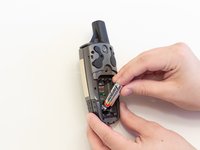
    3. Garmin GPSmap 60CSx Screen Replacement: 步骤 3 中的图像 1,2 Garmin GPSmap 60CSx Screen Replacement: 步骤 3 中的图像 2,2
      • Pull AA batteries out.

      询问修复机器人

      添加评论

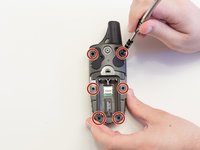
    1. Garmin GPSmap 60CSx Screen Replacement, Screen: 步骤 4 中的图像 1,2 Garmin GPSmap 60CSx Screen Replacement, Screen: 步骤 4 中的图像 2,2
      • Remove the six 10 mm screws on the back of the device with a Phillips #0 Screwdriver.

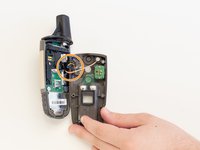
      • Flip the back panel over to view the green electronics board (the PCB) and the PCB cover.

      • Remove the black, yellow, blue, and red wires connected to the PCB with light force.

      询问修复机器人

      添加评论

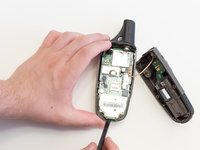
    2. Garmin GPSmap 60CSx Screen Replacement: 步骤 5 中的图像 1,1
      • Take the spudger and place it in the bottom right corner of the black PCB cover.

      • Use the spudger to pry the corner out. This will need to be done to all four corners of the PCB cover.

      • It is best to do remove the bottom corners first.

      • Pull the PCB cover out of the GPSMap 60CSx.

      询问修复机器人

      添加评论

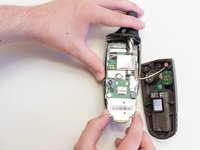
    3. Garmin GPSmap 60CSx Screen Replacement: 步骤 6 中的图像 1,2 Garmin GPSmap 60CSx Screen Replacement: 步骤 6 中的图像 2,2
      • Carefully use the spudger to lift the PCB a few centimeters.

      • Pull the PCB towards the bottom of the GPSMap 60CSx.

      • This will pull the other components out of the GPSMap 60CSx like the antenna and the screen.

      询问修复机器人

      添加评论

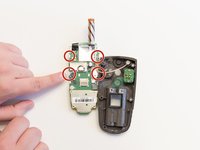
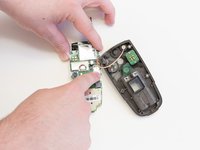
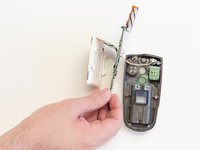
    4. Garmin GPSmap 60CSx Screen Replacement: 步骤 7 中的图像 1,3 Garmin GPSmap 60CSx Screen Replacement: 步骤 7 中的图像 2,3 Garmin GPSmap 60CSx Screen Replacement: 步骤 7 中的图像 3,3
      • Apply light pressure to the four white tabs that are holding the screen in place.

      • The screen will now come off the PCB.

      询问修复机器人

      添加评论

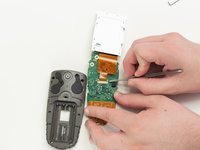
    5. Garmin GPSmap 60CSx Screen Replacement: 步骤 8 中的图像 1,1
      • Turn the PCB over so the screen connector is facing you.

      • Move the screen out of the way for access to the screen connector.

      询问修复机器人

      添加评论

    6. Garmin GPSmap 60CSx Screen Replacement: 步骤 9 中的图像 1,3 Garmin GPSmap 60CSx Screen Replacement: 步骤 9 中的图像 2,3 Garmin GPSmap 60CSx Screen Replacement: 步骤 9 中的图像 3,3
      在这个步骤中使用的工具:
      Tweezers
      $4.99
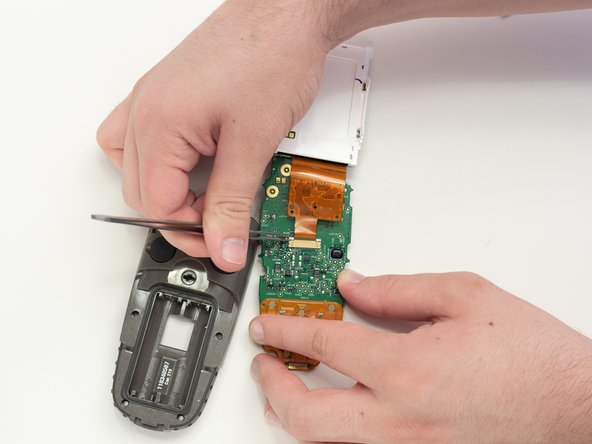
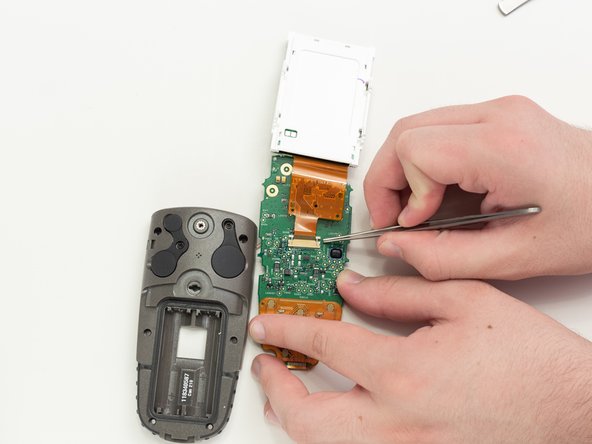
      • Use tweezers to pull the two white pins on the connector forward.

      询问修复机器人

      添加评论

    7. Garmin GPSmap 60CSx Screen Replacement: 步骤 10 中的图像 1,1
      • Remove the screen ribbon connector and screen.

      询问修复机器人

      添加评论

结论

To reassemble your device, follow these instructions in reverse order.

取消:我没有完成这个指南。

5等其他人完成本指南。

2指南评论

i have a 60csx and the battery bounces the liquid, can help me?

salvador2707 - 回复 分享

Thank you for these step by step detailed instructions.

jlciscorp - 回复 分享

添加评论

浏览统计数据:

过去 24 小时: 2

过去 7 天: 14

过去 30 天: 49

总计 5,754