跳转到主内容

Garmin Edge 830 USB Port Replacement

你所需要的

  1. Garmin Edge 830 USB Port  Replacement, Touch Display: 步骤 1 中的图像 1,1
    • Microwave the iOpener for about 30 seconds. Then place it on top of the screen, and let it sit for about 2 minutes.

    • Repeat this process a second to ensure that the glue is becoming loose.

    • Alternative: Use a heat gun or hair dryer to heat up the glue

  2. Garmin Edge 830 USB Port  Replacement: 步骤 2 中的图像 1,1
    • Use the Jimmy tool carve around the edges of the screen to break the glue seal.

  3. Garmin Edge 830 USB Port  Replacement: 步骤 3 中的图像 1,1
    • Use the iFixit plastic opening tool to pry open the screen.

  4. Garmin Edge 830 USB Port  Replacement, Motherboard: 步骤 4 中的图像 1,1
    在这个步骤中使用的工具:
    Tweezers
    $3.99
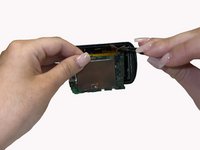
    • Remove brown copper tape with the FPC (not clipped). Removing of the copper tape is necessary, I didn't find a way to avoid it. Try to remove the copper tape as gentle as possible to reuse it.

    • Also remove green tape with angled tweezers and unclip in a 2nd step the FPC from the board

  5. Garmin Edge 830 USB Port  Replacement: 步骤 5 中的图像 1,1
    • Unscrew the three 1 mm screws around the perimeter of the motherboard

    • with the 2nd screw also the light senor will come of the PCB

  6. Garmin Edge 830 USB Port  Replacement: 步骤 6 中的图像 1,1
    • Use the reverse tweezers to gently pull on the silver box on top of the motherboard to remove it from the back cover.

    • Alternative: Use a plastic card in between PCB and cover.

  7. Garmin Edge 830 USB Port  Replacement: 步骤 7 中的图像 1,2 Garmin Edge 830 USB Port  Replacement: 步骤 7 中的图像 2,2
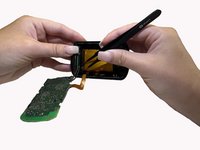
    • Locate the wire connector on the motherboard. Slowly release the wires by gently pulling with the blunt tweezers.

  8. Garmin Edge 830 USB Port  Replacement, Battery: 步骤 8 中的图像 1,1
    • Use the halberd spudger to lift and remove the battery from the back cover.

  9. Garmin Edge 830 USB Port  Replacement, USB Port: 步骤 9 中的图像 1,1
    • With the T4 screwdriver, unscrew the two 1 mm screws on the green piece located on the inside of the cable connector

  10. Garmin Edge 830 USB Port  Replacement: 步骤 10 中的图像 1,1
    • Use the halberd spudger to lift and remove the cable connector from the back cover.

结论

To reassemble your device, follow these instructions in reverse order.

0指南评论

添加评论

浏览统计数据:

过去 24 小时: 0

过去 7 天: 12

过去 30 天: 44

总计 1,387