跳转到主内容
加入维修社区 - 创建账户

Fujitsu LIFEBOOK P7010D Hard Drive Replacement

你所需要的

  1. Fujitsu LIFEBOOK P7010D Hard Drive Replacement, Battery: 步骤 1 中的图像 1,1
    • Place the laptop upside down on a table.

  2. Fujitsu LIFEBOOK P7010D Hard Drive Replacement: 步骤 2 中的图像 1,1
    • Locate the battery (the grey block). Find the two tabs on one end of the battery, as pictured.

    • Using two fingers, press both tabs down at once until they are fully depressed.

  3. Fujitsu LIFEBOOK P7010D Hard Drive Replacement: 步骤 3 中的图像 1,1
    • While holding the tabs down, slowly pivot the battery up.

    • The battery is now free and safe to pull out.

  4. Fujitsu LIFEBOOK P7010D Hard Drive Replacement, Disc Drive: 步骤 4 中的图像 1,3 Fujitsu LIFEBOOK P7010D Hard Drive Replacement, Disc Drive: 步骤 4 中的图像 2,3 Fujitsu LIFEBOOK P7010D Hard Drive Replacement, Disc Drive: 步骤 4 中的图像 3,3
    • Push the tab down as far as possible using your finger or opening tool to unlock the disc drive.

    • While still holding the tab down, use your other hand to pull out the disc drive straight out of its place.

  5. Fujitsu LIFEBOOK P7010D Hard Drive Replacement, Hard Drive: 步骤 5 中的图像 1,2 Fujitsu LIFEBOOK P7010D Hard Drive Replacement, Hard Drive: 步骤 5 中的图像 2,2
    • On the bottom of the laptop, find the two bottom-plate screw holes near the disc drive. Parallel to them is a 2.4mm screw (second photo).

    • After locating the 2.4mm screw, use a Phillips #0 screwdriver to unscrew it.

  6. Fujitsu LIFEBOOK P7010D Hard Drive Replacement: 步骤 6 中的图像 1,2 Fujitsu LIFEBOOK P7010D Hard Drive Replacement: 步骤 6 中的图像 2,2
    在这个步骤中使用的工具:
    Anti-Static Wrist Strap
    $7.95
    • Flip the laptop over and open it facing you.

    • The cover is connected to the inner computer with an aluminum strip, so be careful lifting it.

    • Use a plastic opening tool to lift the bottom black cover on both sides.

    • For the proceeding steps, put on an anti-static wrist strap to protect the delicate circuitry inside the computer. To learn how to use the anti-static wrist strap, click here.

  7. Fujitsu LIFEBOOK P7010D Hard Drive Replacement: 步骤 7 中的图像 1,3 Fujitsu LIFEBOOK P7010D Hard Drive Replacement: 步骤 7 中的图像 2,3 Fujitsu LIFEBOOK P7010D Hard Drive Replacement: 步骤 7 中的图像 3,3
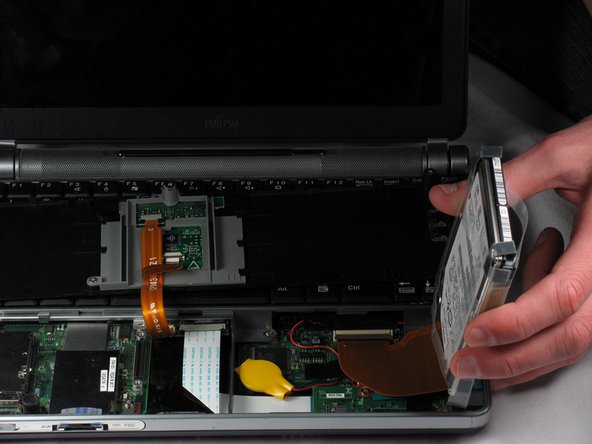
    • The hard drive is connected with a strip, so be careful when lifting it out.

    • Once the black cover is lifted, gently flip it and set it on the keyboard.

    • Locate the disc drive on the right side, as pictured.

    • Using two fingers and the clear plastic handles on the top, gently lift it out. Place it on the side of the laptop.

  8. Fujitsu LIFEBOOK P7010D Hard Drive Replacement: 步骤 8 中的图像 1,3 Fujitsu LIFEBOOK P7010D Hard Drive Replacement: 步骤 8 中的图像 2,3 Fujitsu LIFEBOOK P7010D Hard Drive Replacement: 步骤 8 中的图像 3,3
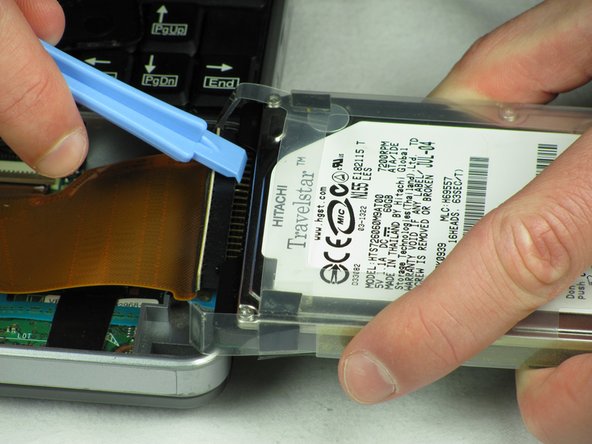
    • Flip the hard drive on its side.

    • The pins connected to the hard drive are extremely fragile. Take care in handling the next few steps.

    • Hold the hard drive and insert a plastic opening tool, preferably a wider one, in between the black pin holder and the hard drive.

    • Gently wiggle the black pin holder back and forth, on each side, until it comes off.

结论

To reassemble your device, follow these instructions in reverse order.

3等其他人完成本指南。

Nicholas Ross

于01/20/12注册

207 声望

创作了7篇指南

团队

Cal Poly, Team 10-31, Amido Winter 2012 Cal Poly, Team 10-31, Amido Winter 2012 的会员

CPSU-AMIDO-W12S10G31

5 名成员

创作了21篇指南

1指南评论

hai sir..please help me..how to replacement hdd lifebook PH770/5AN ? can you answer to my email antogantengnian@gmail.com..thanks a lot

anto adhitya - 回复 分享

添加评论

浏览统计数据:

过去 24 小时: 3

过去 7 天: 10

过去 30 天: 38

总计 5,997