跳转到主内容
加入维修社区 - 创建账户

Front and Back Panel Disassembly

仅作为前提条件
本指南仅提供前提条件!本指南是另一个程序的一部分,不能单独使用。

你所需要的

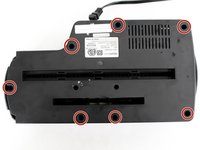
  1. Front and Back Panel Disassembly, Front and Back Panel Disassembly: 步骤 1 中的图像 1,2 Front and Back Panel Disassembly, Front and Back Panel Disassembly: 步骤 1 中的图像 2,2
    • The unit head needs to be switched to the off position and unplugged before any disassembly.

    • When removing screws in the following steps, make sure the unit is resting on a flat surface because pieces will easily come apart.

    • Remove seven 11 mm Phillips #1 screws from the underside of the head unit.

  2. Front and Back Panel Disassembly: 步骤 2 中的图像 1,2 Front and Back Panel Disassembly: 步骤 2 中的图像 2,2
    • Upon removal of the next screws, the front panel and the shredding component attached to it will fall apart from the back panel so have the unit resting on a flat surface.

    • Remove two 50 mm Phillips #1 screws from the middle of the underside of the head unit.

  3. Front and Back Panel Disassembly: 步骤 3 中的图像 1,1
    • Lay the back panel away from the front panel on a flat surface.

    • The back panel will be light because it is only the plastic, while the front panel will be heavy with the shredding component attached to it.

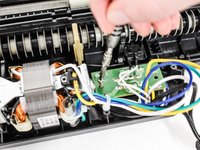
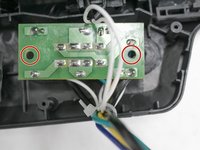
  4. Front and Back Panel Disassembly: 步骤 4 中的图像 1,2 Front and Back Panel Disassembly: 步骤 4 中的图像 2,2
    • Find the green control board that is located next to the shredding motor.

    • Remove two 11 mm Phillips #1 screws located on opposite sides of the control board.

    • You may need to move wires over to find the screws.

结论

To reassemble your device, follow these instructions in reverse order.

Natalie Meert

于02/11/16注册

690 声望

创作了4篇指南

团队

IUPUI, Team 2-4, Baechle Spring 2016 IUPUI, Team 2-4, Baechle Spring 2016 的会员

IUPUI-BAECHLE-S16S2G4

4 名成员

创作了8篇指南

0指南评论

添加评论

浏览统计数据:

过去 24 小时: 0

过去 7 天: 0

过去 30 天: 5

总计 101