跳转到主内容
加入维修社区 - 创建账户

Dopo Double Power 7 Camera Replacement

你所需要的

  1. Dopo Double Power 7 Camera Replacement, Rear Panel: 步骤 1 中的图像 1,1
    • The rear panel is secured to the front case and can simply be pried apart without damage.

    询问修复机器人

    添加评论

  2. Dopo Double Power 7 Camera Replacement: 步骤 2 中的图像 1,1
    • Carefully, wedge the plastic opening tool in-between the seam that separates both halves of the tablet.

    询问修复机器人

    添加评论

  3. Dopo Double Power 7 Camera Replacement: 步骤 3 中的图像 1,1
    • Run the plastic opening tool along the seam looking for the clips and lift up on the rear panel.

    询问修复机器人

    添加评论

  4. Dopo Double Power 7 Camera Replacement: 步骤 4 中的图像 1,1
    • The rear panel should come completely off.

    询问修复机器人

    添加评论

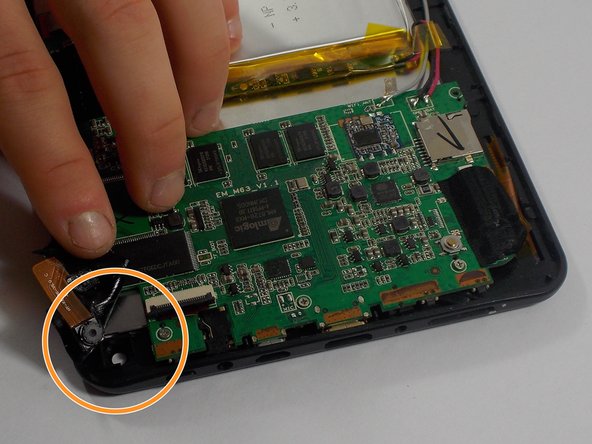
  5. Dopo Double Power 7 Camera Replacement, Camera: 步骤 5 中的图像 1,1
    • Remove any black static tape that may be covering the motherboard.

    询问修复机器人

    添加评论

  6. Dopo Double Power 7 Camera Replacement: 步骤 6 中的图像 1,2 Dopo Double Power 7 Camera Replacement: 步骤 6 中的图像 2,2
    • The camera is taped in place.

    • Use the flat end of a spudger to disconnect the front-facing camera cable from its socket on the motherboard.

    • Our cable had previously been cut but yours can be disconnected by lifting up on the black section of the socket, as shown by the arrow, and pulling the cable out.

    • Simply, pull back the tape and remove the camera.

    询问修复机器人

    添加评论

结论

To reassemble your device, follow these instructions in reverse order.

取消:我没有完成这个指南。

另外一个人完成了本指南。

mike pelosi

于10/30/15注册

682 声望

创作了6篇指南

团队

UMass Dartmouth, Team 1-2, Miles Fall 2015 UMass Dartmouth, Team 1-2, Miles Fall 2015 的会员

UMASSD-MILES-F15S1G2

4 名成员

创作了12篇指南

0指南评论

添加评论

浏览统计数据:

过去 24 小时: 1

过去 7 天: 3

过去 30 天: 31

总计 438