跳转到主内容
加入维修社区 - 创建账户

Disassembling Nest Dropcam Pro Outer Case

仅作为前提条件
本指南仅提供前提条件!本指南是另一个程序的一部分,不能单独使用。

你所需要的

  1. Disassembling Nest Dropcam Pro Outer Case, Outer Case: 步骤 1 中的图像 1,1
    • Press in the mounting clips on each side of the case to remove the camera from the mount.

  2. Disassembling Nest Dropcam Pro Outer Case: 步骤 2 中的图像 1,2 Disassembling Nest Dropcam Pro Outer Case: 步骤 2 中的图像 2,2
    • Using a Philips #0 screwdriver, remove the four 3 mm screws.

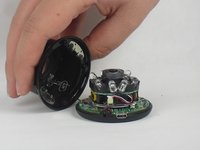
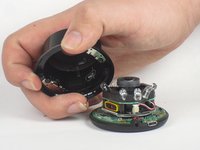
  3. Disassembling Nest Dropcam Pro Outer Case: 步骤 3 中的图像 1,2 Disassembling Nest Dropcam Pro Outer Case: 步骤 3 中的图像 2,2
    • Lift the front of the case slowly, as there is an antenna cable attached to the motherboard.

    • Carefully disconnect the antenna cable from the motherboard. You will feel this cable "pop" out of place when disconnected.

结论

To reassemble your device, follow these instructions in reverse order.

David Foens

于09/03/15注册

896 声望

创作了6篇指南

团队

USF Tampa, Team 15-4, Blackwell Fall 2015 USF Tampa, Team 15-4, Blackwell Fall 2015 的会员

USFT-BLACKWELL-F15S15G4

3 名成员

创作了12篇指南

0指南评论

添加评论

浏览统计数据:

过去 24 小时: 0

过去 7 天: 0

过去 30 天: 4

总计 122