跳转到主内容
加入维修社区 - 创建账户

Dell Netbook e6400 Tastiera Replacement

  1. Dell Netbook e6400 Tastiera Replacement, Tastiera: 步骤 1 中的图像 1,1
    • Rimuovere batteria

  2. Dell Netbook e6400 Tastiera Replacement: 步骤 2 中的图像 1,2 Dell Netbook e6400 Tastiera Replacement: 步骤 2 中的图像 2,2
    • Estrarre la card dalle slot tirando la linguetta

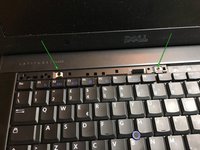
    • Facendo leva sugli agganci in plastica si sgancia nella parte anteriore la linea di tasti in alto che danno accesso alle viti fissaggio tastiera

  3. Dell Netbook e6400 Tastiera Replacement: 步骤 3 中的图像 1,1
    • Fare leva sotto per estrarre la linea di tasti superiore

  4. Dell Netbook e6400 Tastiera Replacement: 步骤 4 中的图像 1,3 Dell Netbook e6400 Tastiera Replacement: 步骤 4 中的图像 2,3 Dell Netbook e6400 Tastiera Replacement: 步骤 4 中的图像 3,3
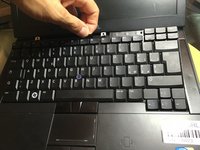
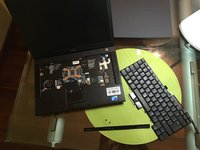
    • Svitare le due viti a croce che tengono la tastiera fissata al corpo notebook

    • Nuova riga.itilizzare la linguetta nera per tirare indietro e verso l'altro per sganciare la tastiera

结论

Per rimontare il dispositivo, segui queste istruzioni in ordine inverso.

8等其他人完成本指南。

Smilzo

于11/09/13注册

12,137 声望

创作了39篇指南

2指南评论

ciao and thanks for this guide @smilzo !

I recently had to re-seat the keyboard, which is a common trick for old Dell laptops when the keyboards starts having issues and types nonsense. However after putting it back together, the keyboard doesn’t light up anymore. what am I doing wrong? did I miss a connector?

alfx - 回复

hi, sorry for what happened, try to disassemble the keyboard again and check that the connectors are inserted well on the correct side and that the cable has not broken.  good luck

Smilzo -

添加评论

浏览统计数据:

过去 24 小时: 1

过去 7 天: 4

过去 30 天: 31

总计 1,894