跳转到主内容

Dell Inspiron 14 3459 Hard Drive Replacement

你所需要的

  1. Dell Inspiron 14 3459 Hard Drive Replacement, Remove the Screws: 步骤 1 中的图像 1,1
    • WARNING: Before working inside your computer, read the safety information that shipped with your computer and follow the steps in Before Working Inside Your Computer. After working inside your computer, follow the instructions in After Working Inside Your Computer.

    • CAUTION: Hard drives are fragile. Exercise care when handling the hard drive.

    • Remove the screws that secure the hard-drive assembly to the computer base.

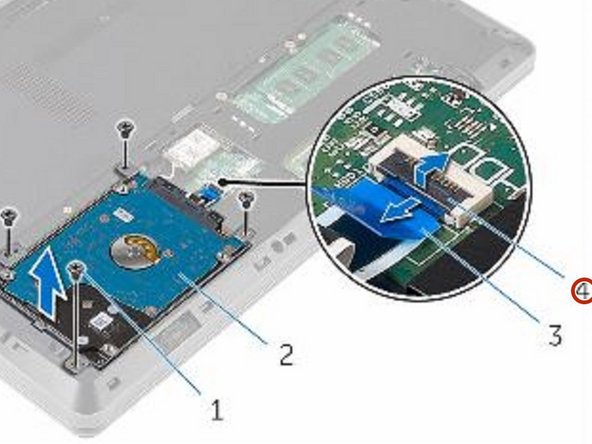
  2. Dell Inspiron 14 3459 Hard Drive Replacement, Disconnect the Hard Drive Cable: 步骤 2 中的图像 1,2 Dell Inspiron 14 3459 Hard Drive Replacement, Disconnect the Hard Drive Cable: 步骤 2 中的图像 2,2
    • Open the latch and disconnect the hard-drive cable from the system board.

  3. Dell Inspiron 14 3459 Hard Drive Replacement, Lifting the Hard-Drive Assembly: 步骤 3 中的图像 1,1
    • Lift the hard-drive assembly off the computer base.

  4. Dell Inspiron 14 3459 Hard Drive Replacement, Remove the Screws: 步骤 4 中的图像 1,1
    • Remove the screws that secure the hard-drive bracket to the hard drive.

  5. Dell Inspiron 14 3459 Hard Drive Replacement, Lifting the Hard-Drive Bracket: 步骤 5 中的图像 1,1
    • Lift the hard-drive bracket off the hard drive.

  6. Dell Inspiron 14 3459 Hard Drive Replacement, Disconnecting the Interposer: 步骤 6 中的图像 1,1
    • Disconnect the interposer from the hard drive.

  7. Dell Inspiron 14 3459 Hard Drive Replacement, Connecting the Interposer: 步骤 7 中的图像 1,1
    • Connect the interposer to the NEW hard drive.

  8. Dell Inspiron 14 3459 Hard Drive Replacement, Align the Screw Holes: 步骤 8 中的图像 1,1
    • Align the screw holes on the hard-drive bracket with the screw holes on the hard drive.

  9. Dell Inspiron 14 3459 Hard Drive Replacement, Replace the Screws: 步骤 9 中的图像 1,1
    • Replace the screws that secure the hard-drive bracket to the hard drive.

  10. Dell Inspiron 14 3459 Hard Drive Replacement, Align the Screw Holes: 步骤 10 中的图像 1,1
    • Align the screw holes on the hard-drive assembly with the screw holes on the computer base.

  11. Dell Inspiron 14 3459 Hard Drive Replacement, Replace the Screws: 步骤 11 中的图像 1,1
    • Replace the screws that secure the hard-drive assembly to the computer base.

  12. Dell Inspiron 14 3459 Hard Drive Replacement, Securing the Hard Drive Cable: 步骤 12 中的图像 1,2 Dell Inspiron 14 3459 Hard Drive Replacement, Securing the Hard Drive Cable: 步骤 12 中的图像 2,2
    • Slide the hard-drive cable into the system board and close the latch to secure the cable.

终点

Terrence15

于12/18/17注册

79,831 声望

创作了441篇指南

团队

RampUP America, Inc. RampUP America, Inc. 的会员

Community

43 名成员

创作了1,991篇指南

0指南评论

添加评论

浏览统计数据:

过去 24 小时: 0

过去 7 天: 2

过去 30 天: 9

总计 1,421