
D-Link HD Wi-Fi Camera LED Lights Replacement

最后更新于 2017年12月15日
浏览量: 1056
浏览统计数据:
- 过去24小时
- 3
- 过去 7 天:
- 25
- 过去 30 天:
- 77
- 总计
- 1,056
评论: 2
2 comments on steps.
已完成: 2 3
2 人已将本指南标记为“已完成”。你会是下一个完成的人吗?
3 人已将本指南标记为“已完成”。包括你——干的漂亮!
收藏: 1 2
1 人收藏(并订阅)了本指南。你会是下一个吗?
2 人收藏(并订阅)了本指南——这其中包括你!
简介
转到步骤 1 ↓This guide will show how to take apart a D-Link DCS 936L Wi-Fi security camera and remove the board containing the microphone, LED lights, light sensor, and Wi-Fi signal indicator using an opening tool and a Philips#00 screwdriver. Because of how small and fragile these pieces are, as well as the design of the board, we found it is much more realistic (and uses much less swearing) to replace this board rather than attempt to replace the individual elements.
你所需要的
工具


-
-
-
Place the camera upwards between your thumb and first finger.
-
Tilt the camera to the best position and loosen the captive linings using a plastic opening tool.
-
Slide the top cover outwards to separate the upper section from the lower lid using the plastic opening tool.
 询问修复机器人
-
-
-
-
-
-
To remove the front cover, place index finger in the center and pull away from the frame. This may take a little effort, but should not require an opening tool.
-
-
-


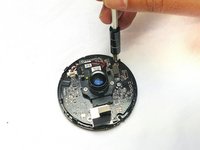
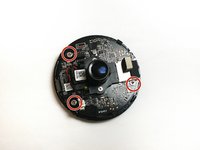


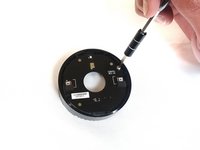
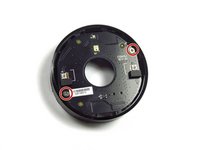

To reassemble your device, follow these instructions in reverse order.
2等其他人完成本指南。

团队

Idaho State University, Team S4-G2, Watkins Fall 2017 Idaho State University, Team S4-G2, Watkins Fall 2017 的会员
ISU-WATKINS-F17S4G2
3 名成员
创作了60篇指南
