跳转到主内容
加入维修社区 - 创建账户

Corsair One i145 M.2 NVME SSD Replacement

浏览量: 3228

浏览统计数据:

过去24小时
3
过去 7 天:
15
过去 30 天:
89
总计
3,228
评论: 1

1 guide comment.

Go to guide comments
已完成: 2

2 人已将本指南标记为“已完成”。你会是下一个完成的人吗?

收藏: 0

暂时还没有人收藏(和订阅)本指南。你会是第一个收藏(和订阅)的人吗?

所需时间: 20分钟
难度: 中等
社区贡献指南

我们社区的一个非常棒的成员制作了本指南。它不是由 iFixit 工作人员创建的。

Corsair One i145 M.2 NVME SSD Replacement

The following replacement guide details how to properly replace the OEM Samsung PM981 M.2 NVME SSD.  Because this involves replacing internal parts of your computer, this could void any remaining warranty.  This replacement is a delicate procedure, there is not much room in this case, and I had to use a Needle-Nose Locking Pliers to help me remove the power connectors from the Graphics Card. You can damage the connectors, the Graphics Card, or other parts of the components, or case If you are not careful. The first part of this guide details how to remove the Graphics Card to get at the M.2 SSD. Please make sure that the Corsair One is powered off and disconnected from the wall. Additionally, ensure you’re careful with the components, as they are incredibly fragile.

你所需要的

工具

    1. Corsair One i145 M.2 NVME SSD Replacement, Remove the Top Facing Fan: 步骤 1 中的图像 1,3 Corsair One i145 M.2 NVME SSD Replacement, Remove the Top Facing Fan: 步骤 1 中的图像 2,3 Corsair One i145 M.2 NVME SSD Replacement, Remove the Top Facing Fan: 步骤 1 中的图像 3,3
      • The button only releases the fan assembly, it does not eject it.

      • Press the button located on the back side upper part of the case.

      • Use a Spudger Tool to help lift the top of the fan assembly. I found that this works better by raising the fan from the top front side of the case, instead of the rear front where the button is located.

      询问修复机器人

      添加评论

    2. Corsair One i145 M.2 NVME SSD Replacement, Open Side Panel: 步骤 2 中的图像 1,3 Corsair One i145 M.2 NVME SSD Replacement, Open Side Panel: 步骤 2 中的图像 2,3 Corsair One i145 M.2 NVME SSD Replacement, Open Side Panel: 步骤 2 中的图像 3,3
      • When opening the panel, and resting the panel on the table, be careful not to put stress on the tubing connected to the heatsink attached to the panel.

      • Disconnect the top assembly/fan power connector from its housing and remove it.

      • Look down into the unit and locate the graphics card. Orientate the unit so that you are opening the side that contains the graphics card.

      • Remove the two screws from that side.

      • As the panel is hooked in from the bottom and the water cooling tubes from the graphics card are attached to the panel with the radiator, take care in pulling the top part of the panel towards you like you are opening a mailbox and let the panel rest flat on the table.

      询问修复机器人

      添加评论

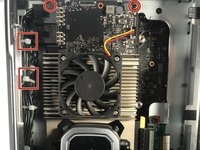
    3. Corsair One i145 M.2 NVME SSD Replacement, Remove Graphics Card Pwr Connector & Screws: 步骤 3 中的图像 1,3 Corsair One i145 M.2 NVME SSD Replacement, Remove Graphics Card Pwr Connector & Screws: 步骤 3 中的图像 2,3 Corsair One i145 M.2 NVME SSD Replacement, Remove Graphics Card Pwr Connector & Screws: 步骤 3 中的图像 3,3
      • Due to the limited space available A tool was required to help remove the power connectors. Using pliers to remove connectors that are usually removed by hand can damage your device if you are not careful. Proceed with caution.

      • Be careful NOT to rock the connector toward/away from you as that can break or bend the connections to the mainboard.

      • You might need to cut one more wire straps (white) to allow the power connectors to be removed from their housing or for the Graphics Card to be tilted out of the case. Be really careful not to cut any wires when removing the straps.

      • Use a spudger to slightly lift the connector hooks that are locking the power connectors in place and very carefully, use a 9in Needle-Nose Locking Pliers set to the lowest tension with enough grip to help you slowly and carefully rock the two power connectors gently up and down to pull the connectors out of their housings.

      • Remove the top and bottom screws that are holding the graphics card in-place

      询问修复机器人

      添加评论

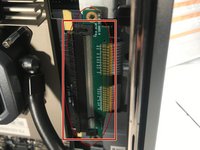
    4. Corsair One i145 M.2 NVME SSD Replacement, Remove PCIe Connector: 步骤 4 中的图像 1,2 Corsair One i145 M.2 NVME SSD Replacement, Remove PCIe Connector: 步骤 4 中的图像 2,2
      • Unscrew the PCIe connector so that the connector is loose from the mount.

      • Slide the PCIe slot off of the connector by hand. Start at the top to gain a little leverage to get the connector started and then leverage the bottom. The connector needs to be removed entirely from the slot gently.

      询问修复机器人

      添加评论

    5. Corsair One i145 M.2 NVME SSD Replacement, Tilt the Graphics Card out of the Case: 步骤 5 中的图像 1,1
      • Lay the graphics card on the panel itself with all of the video connectors still connected.

      询问修复机器人

      添加评论

    6. Corsair One i145 M.2 NVME SSD Replacement, Remove the M.2 SSD Card: 步骤 6 中的图像 1,1
      • Unscrew the fastener screw

      • Lift the M.2SSD partially up from its base and side it out of the socket.

      询问修复机器人

      添加评论

结论

To reassemble your device, follow these instructions in reverse order.

取消:我没有完成这个指南。

2等其他人完成本指南。

1指南评论

for me there was a screw under the black metal that hold the gpu that i needed to get out to get the gpu out

donFAH - 回复 分享

添加评论

浏览统计数据:

过去 24 小时: 3

过去 7 天: 15

过去 30 天: 89

总计 3,228