简介
In the event that your battery dies, you will need to replace it. This guide will show you how.
你所需要的
-
-
-
Use plastic spudger to separate backplate from the front-plate. Place the flat end of the spudger in the seam between the front and back, near one end of the calculator. Then slide the spudger towards the calculator's center. The two sides will pop free from each other as you go through it with the spudger.
-
-
-
Using the pointed end of the nylon spudger, carefully pry an edge of the battery, and lift the battery from its socket.
-


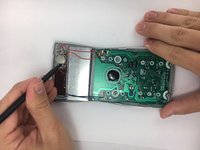
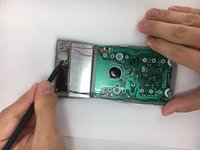
To reassemble your device, follow these instructions in reverse order.
8等其他人完成本指南。



团队

USF Tampa, Team 2-2, Nance Fall 2016 USF Tampa, Team 2-2, Nance Fall 2016 的会员
USFT-NANCE-F16S2G2
4 名成员
创作了15篇指南
2指南评论
I just wanted to be sure that using a spudger wouldn't damage anything inside before actually trying it; this quick guide comfirmed it would be OK. However, I found I had to pry from the gap you can open by hand after removing the screws, rather than from the end as suggested in the guide. Maybe it's different for the version with five screws (from about the year 2005), which I have, instead of the illustrated version with six screws.
What size or type of battery does it take? It would be nice to have it on hand before prying it apart. Thanks-
