跳转到主内容
加入维修社区 - 创建账户

Canon EOS Rebel G Back Panel Replacement

你所需要的

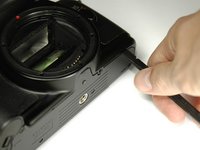
    1. Canon EOS Rebel G Back Panel Replacement, Front Panel: 步骤 1 中的图像 1,1
      • Using a #00 Phillips screw driver, remove three 4.4 mm Phillips screws as indicated by the red circles.

      询问修复机器人

      添加评论

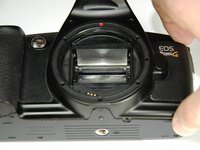
    2. Canon EOS Rebel G Back Panel Replacement: 步骤 2 中的图像 1,2 Canon EOS Rebel G Back Panel Replacement: 步骤 2 中的图像 2,2
      • Using your finger, peel back the textured grip so the components are separated.

      询问修复机器人

      添加评论

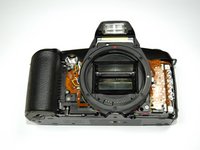
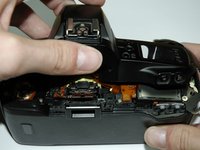
    3. Canon EOS Rebel G Back Panel Replacement: 步骤 3 中的图像 1,3 Canon EOS Rebel G Back Panel Replacement: 步骤 3 中的图像 2,3 Canon EOS Rebel G Back Panel Replacement: 步骤 3 中的图像 3,3
      • Using the flat end of a spudger, loosen the connection between the front panel and the device.

      • Remove the front panel using your hands.

      询问修复机器人

      添加评论

    1. Canon EOS Rebel G Back Panel Replacement, Top Panel: 步骤 4 中的图像 1,1
      • Turn Camera over.

      • Using a #00 Phillips screw driver, unscrew the two 4.9 mm Phillips screws located on either side of the viewfinder.

      询问修复机器人

      添加评论

    2. Canon EOS Rebel G Back Panel Replacement: 步骤 5 中的图像 1,1
      • Using a #00 Phillips screw driver, unscrew the one 5.7 mm Phillips screw located next to the LCD screen.

      询问修复机器人

      添加评论

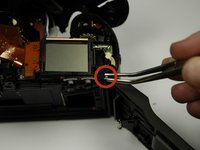
    3. Canon EOS Rebel G Back Panel Replacement: 步骤 6 中的图像 1,1
      • Lay the camera on its back.

      • Unsolder the flash connection from the motherboard as noted by the blue circle.

      询问修复机器人

      添加评论

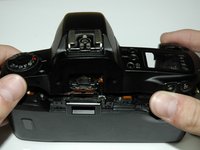
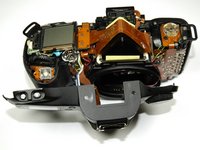
    4. Canon EOS Rebel G Back Panel Replacement: 步骤 7 中的图像 1,3 Canon EOS Rebel G Back Panel Replacement: 步骤 7 中的图像 2,3 Canon EOS Rebel G Back Panel Replacement: 步骤 7 中的图像 3,3
      • Remove the top panel by lifting it from the back, pushing it forward over the camera and letting it rotate down in front of the camera.

      询问修复机器人

      添加评论

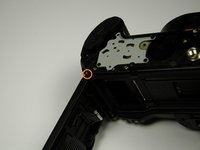
    1. Canon EOS Rebel G Back Panel Replacement, Back Panel: 步骤 8 中的图像 1,1
      • Using a #00 Philllips screw driver, unscrew the 6.8 mm Phillips screw that holds the strap anchor noted by the red circle.

      • Remove the strap anchor.

      询问修复机器人

      添加评论

    2. Canon EOS Rebel G Back Panel Replacement: 步骤 9 中的图像 1,1
      • Unlatch the back panel.

      • Using a #00 Phillips screw driver, unscrew the six screws on the bottom of the camera.

      • One 7.4 mm Phillips screw

      • Two 6.0 mm Phillips screws

      • Two 4.4 mm Phillips screws

      • One 3.9 mm Phillips screw

      询问修复机器人

      添加评论

    3. Canon EOS Rebel G Back Panel Replacement: 步骤 10 中的图像 1,3 Canon EOS Rebel G Back Panel Replacement: 步骤 10 中的图像 2,3 Canon EOS Rebel G Back Panel Replacement: 步骤 10 中的图像 3,3
      在这个步骤中使用的工具:
      Tweezers
      $4.99
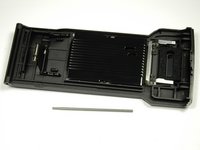
      • From the bottom of the camera push the hinge rod in with your finger.

      • Return the camera to its upright position.

      • Use pliers (or tweezers) to pull the rod out from the top.

      询问修复机器人

      添加评论

结论

To reassemble your device, follow these instructions in reverse order.

取消:我没有完成这个指南。

Zach

于04/04/12注册

46 声望

创作了8篇指南

团队

Cal Poly, Team 14-9, Forte Spring 2012 Cal Poly, Team 14-9, Forte Spring 2012 的会员

CPSU-FORTE-S12S14G9

5 名成员

创作了36篇指南

0指南评论

添加评论

浏览统计数据:

过去 24 小时: 2

过去 7 天: 7

过去 30 天: 26

总计 2,436