跳转到主内容

Brother CS6000i LCD Screen Replacement

你所需要的

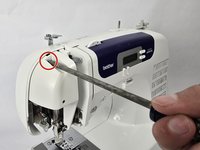
  1. Brother CS6000i LCD Screen Replacement, Body: 步骤 1 中的图像 1,2 Brother CS6000i LCD Screen Replacement, Body: 步骤 1 中的图像 2,2
    • Remove the five 20 mm Phillips #2 screws on the back of the device.

    • Remove the single 28 mm Phillips #2 screw on the back of the device.

    • Remove the single 23 mm Phillips #2 screw on the back of the device.

  2. Brother CS6000i LCD Screen Replacement: 步骤 2 中的图像 1,2 Brother CS6000i LCD Screen Replacement: 步骤 2 中的图像 2,2
    • Pull the white cover off.

  3. Brother CS6000i LCD Screen Replacement: 步骤 3 中的图像 1,2 Brother CS6000i LCD Screen Replacement: 步骤 3 中的图像 2,2
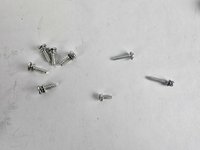
    • Remove the final screw, a 11 mm Phillips #2.

    • After removing all eight screws, you will have five 2 mm screws, one 28 mm screw, one 23 mm screw, and one 11 mm screw, all of which are Phillips #2.

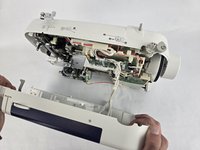
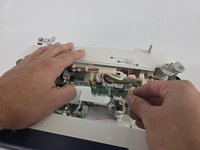
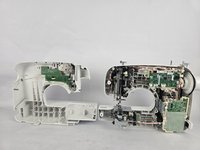
  4. Brother CS6000i LCD Screen Replacement: 步骤 4 中的图像 1,3 Brother CS6000i LCD Screen Replacement: 步骤 4 中的图像 2,3 Brother CS6000i LCD Screen Replacement: 步骤 4 中的图像 3,3
    • Slightly pull apart the two halves of the machine, taking care not to strain the attached cables.

    • Unhook the white wires that are connected to the motherboard.

    • Fully separate the two halves.

  5. Brother CS6000i LCD Screen Replacement, LCD Screen: 步骤 5 中的图像 1,1
    • Remove the two 10 mm Philips #2 screws that secure the screen.

    • Unplug the ribbon cable located at the top of the circuit board, then gently remove the LCD screen.

结论

To reassemble your device, follow these instructions in reverse order.

另外一个人完成了本指南。

团队

Cuesta, Team 20-1, Krynen Fall 2024 Cuesta, Team 20-1, Krynen Fall 2024 的会员

CUESTA-KRYNEN-F24S20G1

5 名成员

创作了8篇指南

0指南评论

添加评论

浏览统计数据:

过去 24 小时: 2

过去 7 天: 2

过去 30 天: 20

总计 227