跳转到主内容

Brother CS6000i Body Replacement

你所需要的

  1. Brother CS6000i Body Replacement, Body: 步骤 1 中的图像 1,2 Brother CS6000i Body Replacement, Body: 步骤 1 中的图像 2,2
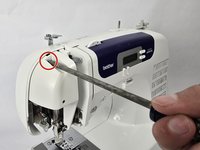
    • Remove the five 20 mm Phillips #2 screws on the back of the device.

    • Remove the single 28 mm Phillips #2 screw on the back of the device.

    • Remove the single 23 mm Phillips #2 screw on the back of the device.

  2. Brother CS6000i Body Replacement: 步骤 2 中的图像 1,2 Brother CS6000i Body Replacement: 步骤 2 中的图像 2,2
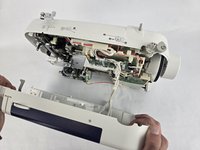
    • Pull the white cover off.

  3. Brother CS6000i Body Replacement: 步骤 3 中的图像 1,2 Brother CS6000i Body Replacement: 步骤 3 中的图像 2,2
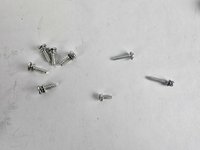
    • Remove the final screw, a 11 mm Phillips #2.

    • After removing all eight screws, you will have five 2 mm screws, one 28 mm screw, one 23 mm screw, and one 11 mm screw, all of which are Phillips #2.

  4. Brother CS6000i Body Replacement: 步骤 4 中的图像 1,3 Brother CS6000i Body Replacement: 步骤 4 中的图像 2,3 Brother CS6000i Body Replacement: 步骤 4 中的图像 3,3
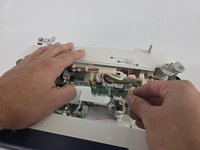
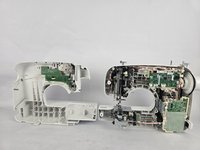
    • Slightly pull apart the two halves of the machine, taking care not to strain the attached cables.

    • Unhook the white wires that are connected to the motherboard.

    • Fully separate the two halves.

结论

To reassemble your device, follow these instructions in reverse order.

另外一个人完成了本指南。

Ava Martinez

于10/31/24注册

448 声望

创作了4篇指南

团队

Cuesta, Team 20-1, Krynen Fall 2024 Cuesta, Team 20-1, Krynen Fall 2024 的会员

CUESTA-KRYNEN-F24S20G1

5 名成员

创作了8篇指南

0指南评论

添加评论

浏览统计数据:

过去 24 小时: 1

过去 7 天: 14

过去 30 天: 79

总计 779