跳转到主内容
加入维修社区 - 创建账户

Belkin NetCam HD Case Replacement

仅作为前提条件
本指南仅提供前提条件!本指南是另一个程序的一部分,不能单独使用。

你所需要的

  1. Belkin NetCam HD Case Replacement, Case: 步骤 1 中的图像 1,1
    • Use a wrench to loosen up the stand from the back in order to hold the NetCam more comfortably.

  2. Belkin NetCam HD Case Replacement: 步骤 2 中的图像 1,1
    • Work a plastic opening tool into the seam and pry the face plate away from the back panel.

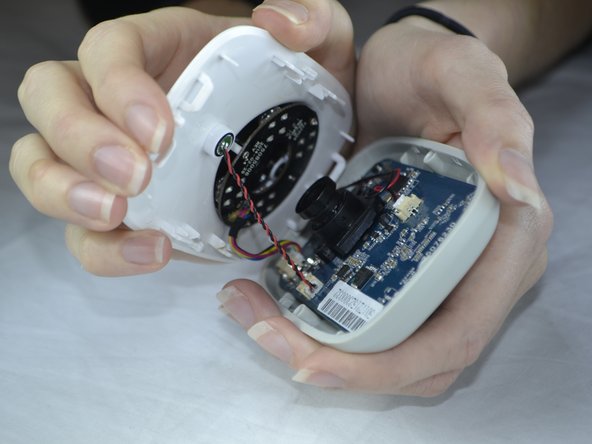
  3. Belkin NetCam HD Case Replacement: 步骤 3 中的图像 1,2 Belkin NetCam HD Case Replacement: 步骤 3 中的图像 2,2
    • Use pressure to separate the covers.

    • When pulling the device apart, separate from the bottom up in order to avoid pulling the wiring at the top apart.

结论

To reassemble your device, follow these instructions in reverse order.

团队

USF Tampa, Team 3-5, Sullivan Fall 2016 USF Tampa, Team 3-5, Sullivan Fall 2016 的会员

USFT-SULLIVAN-F16S3G5

4 名成员

创作了14篇指南

0指南评论

添加评论

浏览统计数据:

过去 24 小时: 1

过去 7 天: 5

过去 30 天: 11

总计 97