跳转到主内容
加入维修社区 - 创建账户

BLU Studio 5.5 Motherboard Replacement

浏览量: 2077

浏览统计数据:

过去24小时
3
过去 7 天:
13
过去 30 天:
91
总计
2,077
评论: 1

1 guide comment.

Go to guide comments
已完成: 1

1 人已将本指南标记为“已完成”。你会是下一个完成的人吗?

收藏: 0

暂时还没有人收藏(和订阅)本指南。你会是第一个收藏(和订阅)的人吗?

所需时间: 8 - 10 分钟
难度: 中等
特色学生指南

该指南是我们优秀学生的辛勤劳动的成果,iFixit的工作人员认为这个很酷。

BLU Studio 5.5 Motherboard Replacement

The motherboard is the central control unit for the entire phone and if damaged will most likely result in your phone not working whatsoever. Take into consideration that static forces may damage the board itself so pay attention to caution steps to avoid any potential damage.

你所需要的

工具

    1. BLU Studio 5.5 Motherboard Replacement, Battery: 步骤 1 中的图像 1,3 BLU Studio 5.5 Motherboard Replacement, Battery: 步骤 1 中的图像 2,3 BLU Studio 5.5 Motherboard Replacement, Battery: 步骤 1 中的图像 3,3
      • Locate the notch to remove the back panel at the lower left corner of the panel.

      • Insert the plastic opening tool or a fingernail into the notch.

      • Apply force upwards until back panel becomes loosened.

      询问修复机器人

      添加评论

    2. BLU Studio 5.5 Motherboard Replacement: 步骤 2 中的图像 1,2 BLU Studio 5.5 Motherboard Replacement: 步骤 2 中的图像 2,2
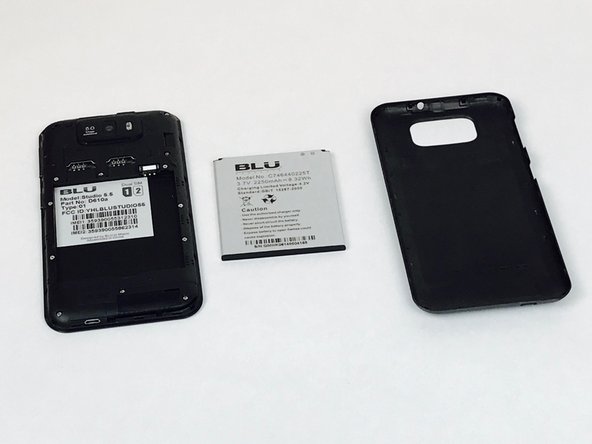
      • Remove the loosened back panel and set aside.

      • Locate the notch to remove the battery.

      询问修复机器人

      添加评论

    3. BLU Studio 5.5 Motherboard Replacement: 步骤 3 中的图像 1,3 BLU Studio 5.5 Motherboard Replacement: 步骤 3 中的图像 2,3 BLU Studio 5.5 Motherboard Replacement: 步骤 3 中的图像 3,3
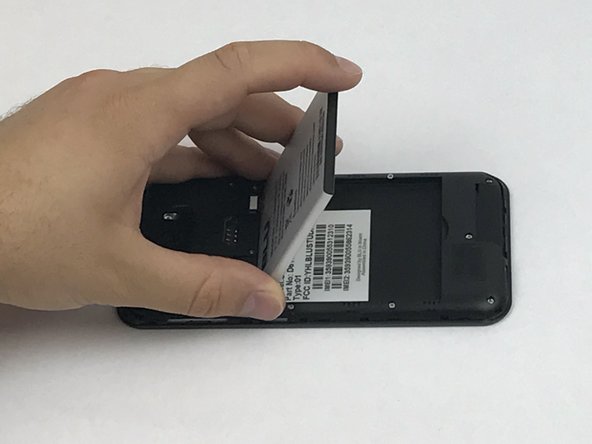
      • Insert a plastic opening tool or your fingernail into the notch and apply force upwards until the battery is loosened.

      • Remove the battery and set aside.

      询问修复机器人

      添加评论

    1. BLU Studio 5.5 Motherboard Replacement, Back Panel Assembly: 步骤 4 中的图像 1,2 BLU Studio 5.5 Motherboard Replacement, Back Panel Assembly: 步骤 4 中的图像 2,2
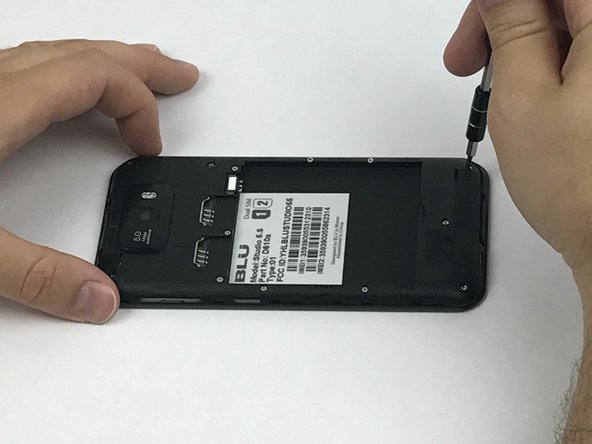
      • Locate all twelve screws along the back panel:

      • Seven 5mm screws.

      • Five 3.5mm screws.

      • Using a Phillips #000 screwdriver, remove all twelve screws.

      询问修复机器人

      添加评论

    2. BLU Studio 5.5 Motherboard Replacement: 步骤 5 中的图像 1,3 BLU Studio 5.5 Motherboard Replacement: 步骤 5 中的图像 2,3 BLU Studio 5.5 Motherboard Replacement: 步骤 5 中的图像 3,3
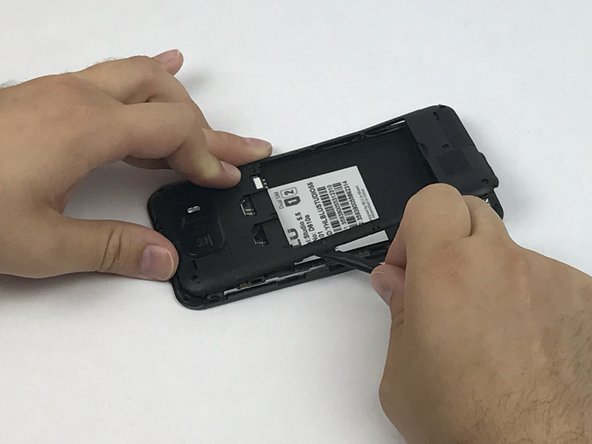
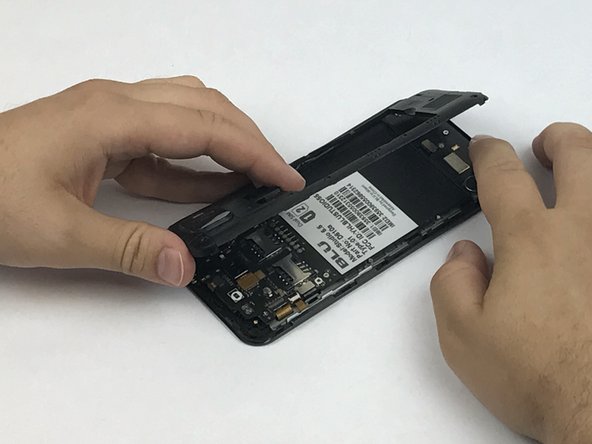
      • Now that all the screws have been removed, use a plastic opening tool to carefully pry at each of the corners until loosened.

      • Be extra careful when prying open as it may damage or snap the thin sides of the panel.

      • Place the plastic opening tool inside the loosened panel and gently push upwards and move along the phone to remove the back panel.

      • Remove the panel as if you were turning the page of a book.

      询问修复机器人

      添加评论

    1. BLU Studio 5.5 Motherboard Replacement, Motherboard: 步骤 6 中的图像 1,3 BLU Studio 5.5 Motherboard Replacement, Motherboard: 步骤 6 中的图像 2,3 BLU Studio 5.5 Motherboard Replacement, Motherboard: 步骤 6 中的图像 3,3
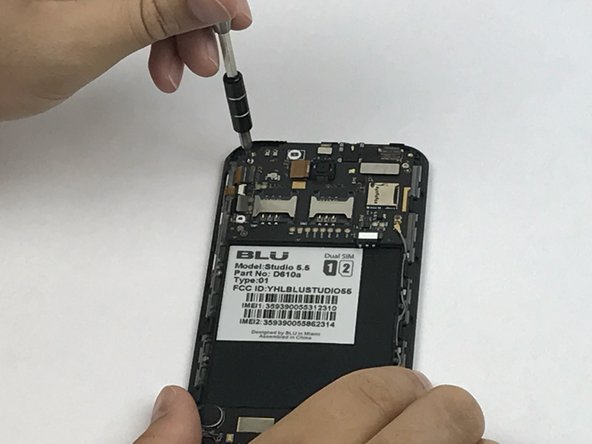
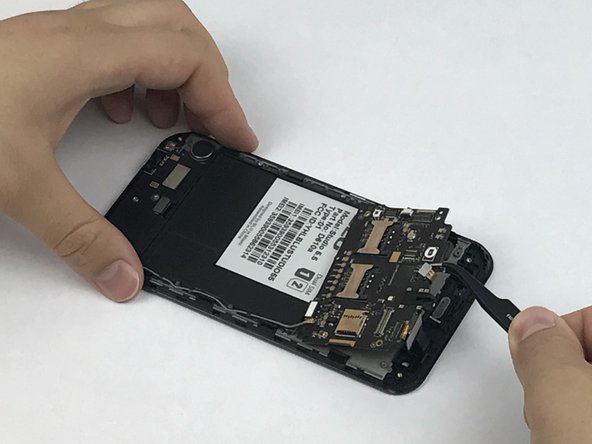
      • Locate the motherboard that is above where the battery was removed.

      • Remove the three screws holding down the motherboard to the phone.

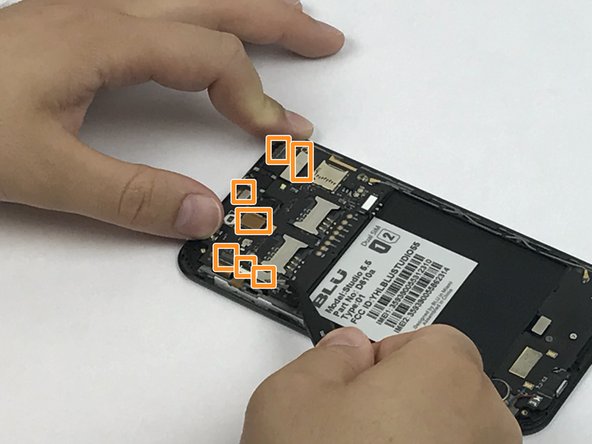
      • Locate all 7 flex cable connectors that are attached to the motherboard.

      询问修复机器人

      添加评论

    2. BLU Studio 5.5 Motherboard Replacement: 步骤 7 中的图像 1,3 BLU Studio 5.5 Motherboard Replacement: 步骤 7 中的图像 2,3 BLU Studio 5.5 Motherboard Replacement: 步骤 7 中的图像 3,3
      在这个步骤中使用的工具:
      Anti-Static Wrist Strap
      $7.95
      • Use tweezers to carefully grasp and unhook all 7 flex cable connectors.

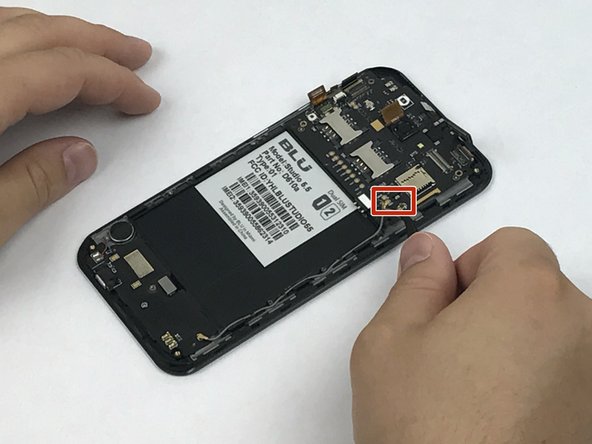
      • With the same tweezers, pry off the cable clasp that connects the motherboard to the sub PCBA.

      • Once the motherboard is disconnected from all components, use the tweezers or your fingers to remove it from the phone assembly.

      • Use the Anti-Static Wrist Strap to eliminate the possibility of introducing a static force that may damage the motherboard components.

      询问修复机器人

      添加评论

结论

To reassemble your device, follow these instructions in reverse order.

取消:我没有完成这个指南。

另外一个人完成了本指南。

团队

USF Tampa, Team S1-G6, Nance Spring 2017 USF Tampa, Team S1-G6, Nance Spring 2017 的会员

USFT-NANCE-S17S1G6

3 名成员

创作了96篇指南

1指南评论

Can you do a BLU vivo XL4 Teardown?

Michael18751 - 回复 分享

添加评论

浏览统计数据:

过去 24 小时: 3

过去 7 天: 13

过去 30 天: 91

总计 2,077