简介
Replacing the display on the Aranet 4 Home
The aranet 4 uses a 1.54 inch (3.9 centimeters) E-ink display, when dropped the glass on the back of the screen can break causing the display to be stuck on whatever was last shown.
你所需要的
-
-
Remove the battery door and the batteries.
-
Unscrew the two T6 screws.
-
Turn your device over so that the screen faces you and remove the cover.
-
-
-
-
Pull back the screen.
-
Carefully release the display ribbon cable by, depending on your board revision either lifting the brown cover on the flip-up connector or sliding out the stuffer actuator connector. (Refer to the images for clarification.)
-
Remove the old screen.
-
-
-
Insert the new screen's cable into the connector (black side up).
-
Carefully place the front cover back and reassemble the device.
-


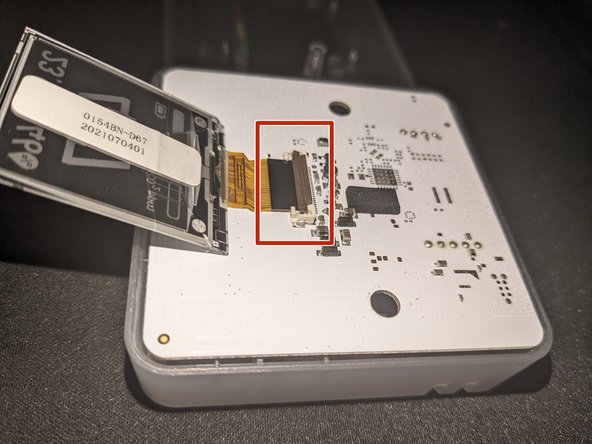
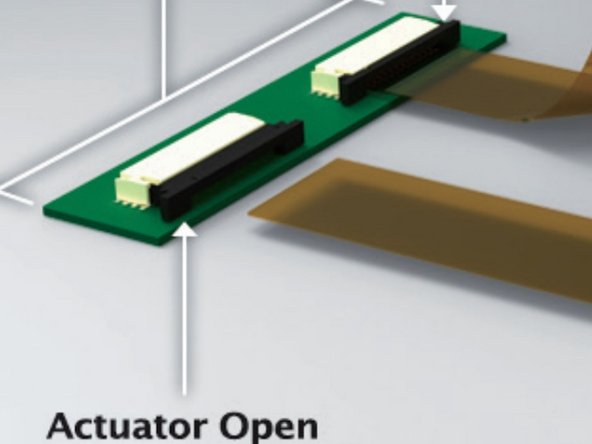


It is not necessary to remove the the board from the bottom-case, if you do wish to do this be carefull not to break the battery terminals!
To reassemble your device, follow these instructions in reverse order.
2等其他人完成本指南。


8指南评论
Great info and instruction. But….. amazone does not ship to The Netherlands.
Cees Doets - 回复
Hi Cees,
You can look for products sold on amazon in different countries using the ASIN number.
Here's a link for the Netherlands: https://www.amazon.nl/dp/B071HW4Z6N
Good luck with your repair!
spoofer -
Thanks a lot! Great info.
Cees Doets - 回复
Yes yes yes. Both my Aranet’s work again.
Cees Doets - 回复
Thanks for the guide! I successfully repaired my Aranet4 by following it. A couple of notes:
- I was able to get a better price than Amazon for the replacement display at https://www.waveshare.com/product/displa....
- The connector for the flexible printed circuit board on my model didn't flip up, but instead slides forward. I found documentation for the connector (or something very very similar to it) here: https://www.te.com/content/dam/te-com/do... (search for "Stuffer Actuator (Plunger Style)")
