跳转到主内容
加入维修社区 - 创建账户

Apple Studio Display M2454 CCFL Inverter Replacement

你所需要的

  1. Apple Studio Display M2454 CCFL Inverter Replacement, CCFL Inverter: 步骤 1 中的图像 1,2 Apple Studio Display M2454 CCFL Inverter Replacement, CCFL Inverter: 步骤 1 中的图像 2,2
    • First remove the three 2mm hex screws from the top of the monitors stand.

    • Then, remove the four 2mm hex screws on the corners of the back panel.

    • Finally, the back panels can be removed by pulling the main cable through the opening and sliding the panels away.

    询问修复机器人

    添加评论

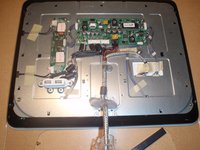
  2. Apple Studio Display M2454 CCFL Inverter Replacement: 步骤 2 中的图像 1,2 Apple Studio Display M2454 CCFL Inverter Replacement: 步骤 2 中的图像 2,2
    • Remove the metal backing.

    • Remove the single screw at the top and the two screws at the bottom of the monitor with #2 philips head screwdriver.

    • Remove the transparent plastic around the USB ports.

    • Push metal backing toward back of monitor to release its clips and pull away.

    询问修复机器人

    添加评论

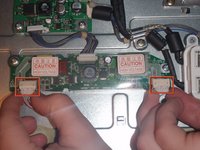
  3. Apple Studio Display M2454 CCFL Inverter Replacement: 步骤 3 中的图像 1,2 Apple Studio Display M2454 CCFL Inverter Replacement: 步骤 3 中的图像 2,2
    • The CCFL inverter board is the smaller of the two circuit boards with two wires and a ribbon cable running out of it.

    • Remove the two cables on the left side of the board, using a pin to insert into the two small holes and then pull out.

    • This step may be easier with two people.

    • Do not insert pin in hole with force or you risk damaging the connector.

    询问修复机器人

    添加评论

  4. Apple Studio Display M2454 CCFL Inverter Replacement: 步骤 4 中的图像 1,1
    • Remove the ribbon cable on the right side of board by pulling it away from the LCD main board with hand.

    询问修复机器人

    添加评论

  5. Apple Studio Display M2454 CCFL Inverter Replacement: 步骤 5 中的图像 1,1
    • Remove the top philips head screws holding the board to the monitor with #2 philips head screwdriver.

    询问修复机器人

    添加评论

  6. Apple Studio Display M2454 CCFL Inverter Replacement: 步骤 6 中的图像 1,1
    • Remove the bottom philips head screw and pull the CCFL Inverter board away from monitor.

    • To replace this part with a new one, simply follow these directions in reverse using the new board.

    询问修复机器人

    添加评论

终点

取消:我没有完成这个指南。

另外一个人完成了本指南。

Dylan Perry

于01/20/10注册

177 声望

创作了5篇指南

团队

Cal Poly, Team 13-27, Maness Winter 2010 Cal Poly, Team 13-27, Maness Winter 2010 的会员

CPSU-MANESS-W10S13G27

4 名成员

创作了14篇指南

0指南评论

添加评论

浏览统计数据:

过去 24 小时: 1

过去 7 天: 8

过去 30 天: 66

总计 7,369