跳转到主内容
加入维修社区 - 创建账户

AmazonBasics B00Q3KFX8U Motor Replacement

浏览量: 1517

浏览统计数据:

过去24小时
2
过去 7 天:
18
过去 30 天:
114
总计
1,517
评论: 2

1 comment on steps, 1 guide comment.

Go to guide comments
已完成: 1

1 人已将本指南标记为“已完成”。你会是下一个完成的人吗?

收藏: 0

暂时还没有人收藏(和订阅)本指南。你会是第一个收藏(和订阅)的人吗?

所需时间: 10 - 20 分钟
难度: 困难
AmazonBasics B00Q3KFX8U Motor Replacement

The drive motor is what powers the shredding teeth via the drive gears. The motor may burn out due to age or extended use. It is found attached to the main shredder housing holding the shredding teeth and the drive gears.

你所需要的

工具

    1. AmazonBasics B00Q3KFX8U Motor Replacement, Drive Gear: 步骤 1 中的图像 1,1
      • Remove the shredder assembly from the paper scrap bin.

      询问修复机器人

      添加评论

    2. AmazonBasics B00Q3KFX8U Motor Replacement: 步骤 2 中的图像 1,1
      • Remove the two 10mm PH1 screws holding the small black panel in place.

      询问修复机器人

      添加评论

    3. AmazonBasics B00Q3KFX8U Motor Replacement: 步骤 3 中的图像 1,2 AmazonBasics B00Q3KFX8U Motor Replacement: 步骤 3 中的图像 2,2
      • Remove the six 14mm PH1 screws holding the bottom cover in place.

      • Remove the cover by lifting straight upwards.

      • One of the screws will be hidden beneath a warranty sticker. Simply push the head of the screwdriver through the sticker to access the screw.

      询问修复机器人

      添加评论

    4. AmazonBasics B00Q3KFX8U Motor Replacement: 步骤 4 中的图像 1,1
      • Remove the blade/motor assembly from the top cover by lifting straight upwards. Do not disconnect any wiring just yet.

      • The blades are sharp. Coming into contact with them may result in injury.

      询问修复机器人

      添加评论

    5. AmazonBasics B00Q3KFX8U Motor Replacement: 步骤 5 中的图像 1,2 AmazonBasics B00Q3KFX8U Motor Replacement: 步骤 5 中的图像 2,2
      • Remove the five 8mm PH2 screws from the bracket holding the gears in place.

      询问修复机器人

      添加评论

    6. AmazonBasics B00Q3KFX8U Motor Replacement: 步骤 6 中的图像 1,1
      • Use a metal spudger to pry the bracket from the main shredder assembly.

      • If the bracket is attached too tightly for the spudger, carefully use a metal screwdriver to pry it loose.

      询问修复机器人

      添加评论

    7. AmazonBasics B00Q3KFX8U Motor Replacement: 步骤 7 中的图像 1,2 AmazonBasics B00Q3KFX8U Motor Replacement: 步骤 7 中的图像 2,2
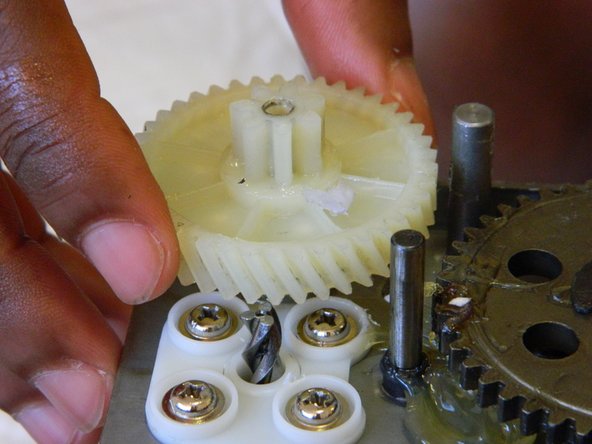
      • Remove the two plastic drive gears from the shredder assembly by lifting straight upwards.

      添加评论

    1. AmazonBasics B00Q3KFX8U Motor Replacement, Motor: 步骤 8 中的图像 1,1
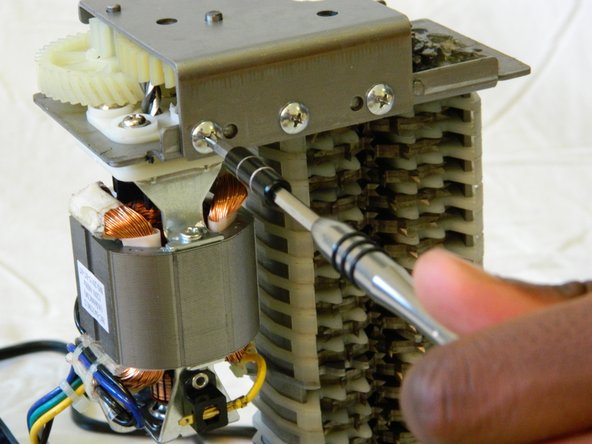
      • Remove the four 18mm PH2 screws holding the motor to the main shredder assembly.

      询问修复机器人

      添加评论

    2. AmazonBasics B00Q3KFX8U Motor Replacement: 步骤 9 中的图像 1,1
      • Disconnect the motor from the motherboard by either clipping the wires, or using a soldering iron to disconnect the wires directly at the board.

      • To reattach the motor, solder the wires back together, or to the motherboard depending on how you removed them.

      询问修复机器人

      添加评论

结论

To reassemble your device, follow these instructions in reverse order.

取消:我没有完成这个指南。

另外一个人完成了本指南。

团队

UMass Dartmouth, Team 1-3, Miles Spring 2016 UMass Dartmouth, Team 1-3, Miles Spring 2016 的会员

UMASSD-MILES-S16S1G3

2 名成员

创作了48篇指南

1指南评论

Do you sell motor?

Binh - 回复 分享

添加评论

浏览统计数据:

过去 24 小时: 2

过去 7 天: 18

过去 30 天: 114

总计 1,517