跳转到主内容
加入维修社区 - 创建账户

Acer AL1916 Stand Replacement

你所需要的

  1. Acer AL1916 Stand Replacement, Stand: 步骤 1 中的图像 1,1
    • Lay the monitor on a flat surface so that the back is facing up.

  2. Acer AL1916 Stand Replacement: 步骤 2 中的图像 1,2 Acer AL1916 Stand Replacement: 步骤 2 中的图像 2,2
    • Grab the hinge cover with both hands on either side of the stand.

    • Squeeze inwards with your thumbs and fingers and lift up to remove the hinge cover.

  3. Acer AL1916 Stand Replacement: 步骤 3 中的图像 1,2 Acer AL1916 Stand Replacement: 步骤 3 中的图像 2,2
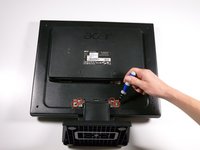
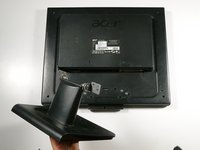
    • Remove the four 12.1 mm Phillips #2 screws that hold the stand to the monitor.

    • Support the monitor while removing the screws to prevent the monitor from falling.

    • Lift up to detach the stand.

结论

To reassemble your device, follow these instructions in reverse order.

8等其他人完成本指南。

Keith

于10/06/11注册

375 声望

创作了4篇指南

团队

Cal Poly, Team 20-26, Maness Fall 2011 Cal Poly, Team 20-26, Maness Fall 2011 的会员

CPSU-MANESS-F11S20G26

4 名成员

创作了14篇指南

2指南评论

Worked great…never would have guessed how to do it. Thanks.

GREG HILL - 回复

I would never have worked out how to remove the stand without this - thank you.

Mark Philipson - 回复

添加评论

浏览统计数据:

过去 24 小时: 1

过去 7 天: 10

过去 30 天: 47

总计 20,916