简介
If you are experiencing performance issues with your ASUS Q405U such as intermittent crashing, lagging, or difficulty turning the computer on, or planning to run applications that require large amounts of memory, use this guide to replace your RAM.
The Random Access Memory (RAM) is high-speed temporary storage that your computer uses to store currently active applications and data, allowing for fast access by the CPU. If you do not have the proper amount of RAM memory or if your RAM is broken, you will have problems with the computer's speed and ability to open applications.
Before using this guide, make sure that your new RAM is compatible with both the motherboard and the operating system. You can do this by looking at the motherboard and the operating system manuals.
Once you have the proper RAM, shut down the computer and unplug it. Since the RAM is such a sensitive component, it is also important to make sure that you ground yourself to discharge any static electricity by touching an unpainted metal surface on your computer case or wearing an anti-static wrist strap. A static shock to the RAM can damage the component before you even get to replace it.
你所需要的
-
-
Using the Phillips #1 screwdriver, remove eleven (11) 1.5 mm screws from the back cover.
-
-
-
-
OPTIONAL: Additional pictures to demonstrate moving keyboard out of the way without detaching connections.
-
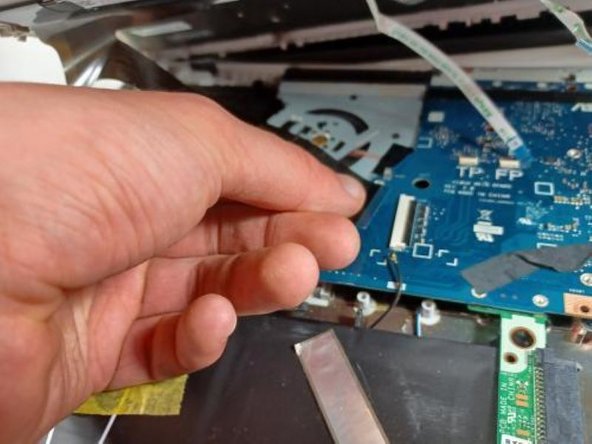
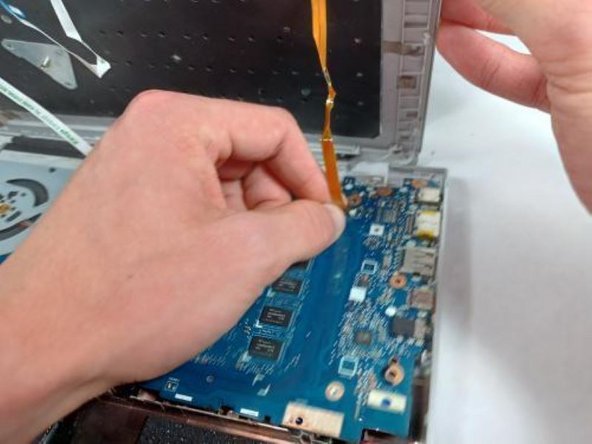
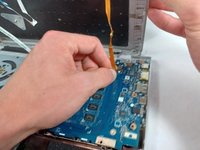
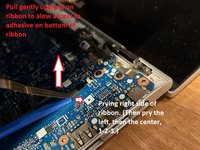
Lift the ribbon cable with gentle pressure, pry the ribbon away from the motherboard on the right side, then the left, then the center, prying away only a little triangle of tape at a time, applying gentle upward pressure to the tape while you loosen and pry.
-
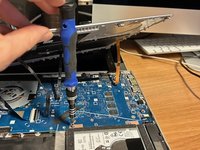
Once you have enough slack in the three ribbons that hold the keyboard down too tightly, lift the front of the keyboard and twist counterclockwise to produce enough room to reach the screws securing the hard drive with your screwdriver.
-





To reassemble your device, follow these instructions in reverse order. Take your e-waste to an R2 or e-Stewards certified recycler.



团队

UMass Dartmouth, Team 2-8, Sinclaire Fall 2021 UMass Dartmouth, Team 2-8, Sinclaire Fall 2021 的会员
UMASSD-SINCLAIRE-F21S2G8
4 名成员
创作了5篇指南
