简介
Prerequisite only.
你所需要的
-
-
Using the Phillips #1 screwdriver, remove eleven (11) 1.5 mm screws from the back cover.
-
-
-
-
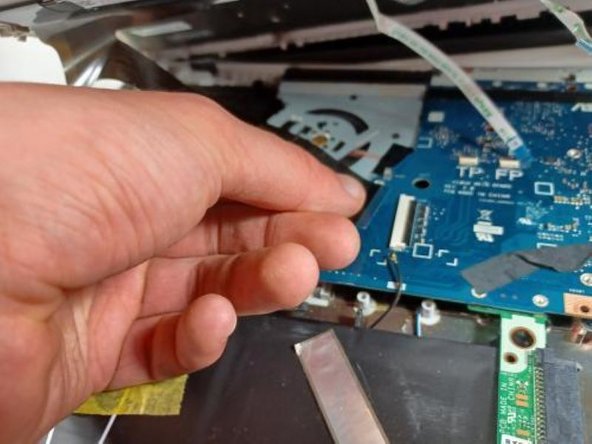
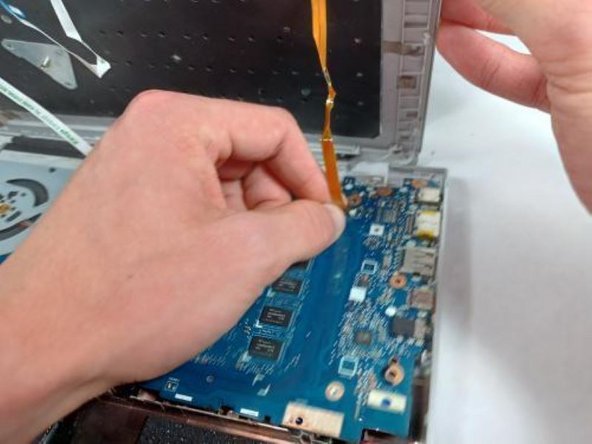
OPTIONAL: Additional pictures to demonstrate moving keyboard out of the way without detaching connections.
-
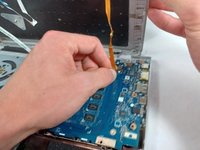
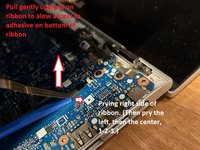
Lift the ribbon cable with gentle pressure, pry the ribbon away from the motherboard on the right side, then the left, then the center, prying away only a little triangle of tape at a time, applying gentle upward pressure to the tape while you loosen and pry.
-
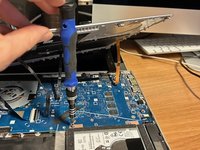
Once you have enough slack in the three ribbons that hold the keyboard down too tightly, lift the front of the keyboard and twist counterclockwise to produce enough room to reach the screws securing the hard drive with your screwdriver.
-




To reassemble your device, follow these instructions in reverse order.



团队

UMass Dartmouth, Team 2-8, Sinclaire Fall 2021 UMass Dartmouth, Team 2-8, Sinclaire Fall 2021 的会员
UMASSD-SINCLAIRE-F21S2G8
4 名成员
创作了5篇指南
