跳转到主内容

Steam Deck 是 Valve 公司于 2022 年 2 月 25 日发布的游戏掌机。本页面包括 Steam Deck 搭载 LCD 屏幕机型的维修指南、拆解信息,以及疑难解答。机型代号1010。

My Up Dpad isn't working

My steam deck up directional button is not given any input or not working at all. My other buttons on my steam deck does including the left, down, and right d pad inputs. I took it apart to see what was wrong with it I can't seem to brainstorm what's going on as everything looks normal inside. So what I need a new membrane Dpad or the entire left bumper board with the d-pad cable?

回答此问题 我也有这个问题

这是一个好问题吗?

得分 2
添加一条评论

3个答案

最有帮助的答案

I had the similar issue so here is the solution log

Issue:

Steam Deck D-Pad "Up" button stopped working. Instead, the Steam and Quick Access ("...") buttons acted as if the "Up" direction was being constantly pressed. Problem persisted even in BIOS, so not OS-related.

Symptoms:

  • "Up" on D-Pad unresponsive
  • Steam and Quick Access buttons behaving like D-Pad Up
  • Input was stuck in a loop, spamming "Up"
  • Occurred even before boot (in BIOS), so not software-related

Fix (worked for me):

  1. Powered off the Deck completely
  2. Opened the back cover
  3. Located the D-Pad ribbon cable (marked “D-PAD” on the daughterboard)
  4. Disconnected the D-Pad ribbon cable from the connector
  5. Booted the Deck with the cable disconnected to confirm buttons behaved normally again
  6. Powered off, reconnected the D-Pad ribbon properly
  7. Booted back up — everything worked normally again

Theory:

It might not have been a physical connection issue. The BIOS input controller may have glitched and started misinterpreting D-Pad input — causing "phantom presses" and remapping behavior. Disconnecting/reconnecting the ribbon cable likely forced a soft reset of the controller's state. So the root cause may be firmware-related, not hardware failure.

Conclusion:

Bad input state or firmware glitch caused phantom input. Simply reseating the D-Pad cable forced the controller to reset. No need for cleaning — just unplug–replug.

Hope this helps someone avoid replacing half their Deck.

这个答案有帮助吗?

得分 2

2条评论:

Thanks a lot! Worked for me

完成的

Yup, re-attaching the D-Pad cable did the trick. No need to turn the SD inbetween the processes, it registered that action naturally.

完成的

添加一条评论

Yes I'm having the exact same problem my up Dpad dosent work at all but the rest does have you found a solution to this situation I even bought a new Dpad cable still dosent work only the left right and down works.

这个答案有帮助吗?

得分 1
添加一条评论

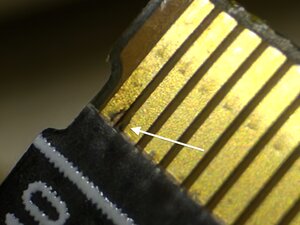
I had this on my D-pad cable:

Block Image

I couldn't find this with the naked eye, after inspecting everything I tried using a magnifying glass, and voila - I found it.

What worked for me was cleaning the space between contacts with a needle.

这个答案有帮助吗?

得分 0
添加一条评论

添加你的答案

Damien Boozer 将永远感激不已
浏览统计数据:

过去 24 小时: 10

过去 7 天: 39

过去 30 天: 155

总计 1,445