跳转到主内容
加入维修社区 - 创建账户

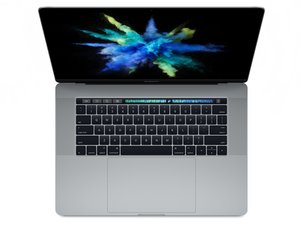
型号 A1707。这款 MacBook Pro 于2017年6月发布,配备 Kaby Lake 处理器,最高可选2.8 GHz 四核 Intel Core i7 处理器,Turbo Boost 最高可达3.8 GHz。

Left fan stuck at high speed

I spilled a little water on the keyboard and immediately dried it out. The laptop functioned perfectly fine after. I was worried that there could be some water deep inside so, a couple days later, I removed the logic board to clean underneath it. There was not any water there. I used canned air to clean out dust, and a hairdryer to make sure there was no water. After reassembling, the left fan has been stuck at full speed whenever the computer is running. I did not remove the fan during this cleaning.

I am using iStat Menus. The thermal sensors appear to be fine.

图片

I am able to use iStat Menus to set the fan speed for the right fan but the left does not respond to the controls.

I tried resetting the SMC and PRAM. I ran an Apple Diagnostics and it said there may be a problem with the fan. I installed a replacement fan and the problem still persists.

What can I do to get the fan under control? Could the heat from the hair dryer have damaged the fan connector or its circuit?

已回答! 显示答案 我也有这个问题

这是一个好问题吗?

得分 3
6条评论

@tbertin Hello! I have same problem on my MBP 15’ 2017. How did you solve this problem?

由完成的

Hello! I have the exact same problem. The left fan stuck at 6500rpm and the right fan is fine. The left fan is also not manually controllable by the Fan control software like TF Pro. How did you solve the problem? Thank you.

由完成的

Did you ever get it repaired or looked at by a company that does component level repair?

由完成的

I did not fix it. It likely needed component level repair which was not worth the cost to me.

由完成的

has anyone solved this issue ? my A1707 has the same issue after the battery is replaced.

By the way, can I just use it with one fan spinning at full speed all the time ?

I just want to use this macbook for one more year, and then I will get a new one.

由完成的

显示更多的1条评论

添加一条评论

9个答案

已选择的解决方案

I seriously doubt canned air would have damaged anything on the logic board..fact is that even if a small amount of water reached the board it might have shorted out a secondary but certainly not useless component.

Fact is that due to the size of parts it's hard to see anything with less than 10x magnifying and often one can't see anything at all and just needs to test power/data lines. If it spins full speed and a replacement fan and smc reset didn't help it's likely the fan speed control data line or related component got damaged. I'm afraid you'll need a component level repair professional here.

这个答案有帮助吗?

得分 2

1条评论:

Thank you. That makes sense.

由完成的

添加一条评论

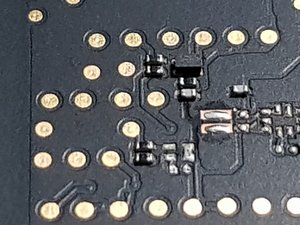
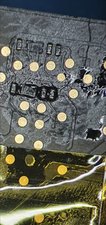
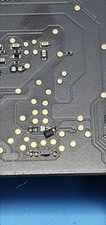
Hi! I have the same issue and I found out one of my transistors, more specifically Q6050 was mising from my board. It was yanked out most probably during reassembly. (Oh yeah, and a resistor too)

图片

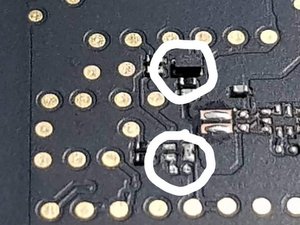
As you can see the trio of black resistors and the transistor in between should be complete each fan but the one at the bottom has missing parts.

图片

The transistor is the black block while the resistors are the silver ones with a black middle. I've ordered these parts online and I'll get back if it fixes the issue.

这个答案有帮助吗?

得分 2

4条评论:

Same for me, thanks. Seems that keyboard ribbon connector cause damage to it, when left under system board.

由完成的

Could you help me understand what is MOSFET? I googled it and I see it's a chip. How do I identify it for my MacBook?

由完成的

this is ridiculous, why are macs so ridiculously touchy and purposely difficult to work on? honestly compared to lenovo they are junk. maybe the m1 is better, but if made the same they are junk. don’t defend them because it’s apple, they should be better than this. i like apple but i know they cut many corners. now do i blame them? !&&* no, because people don’t complain.

由完成的

I have a 2017 A1707 mlb 820-00928 with high fan speed only on left fan. HWMonitor not showing any high temps which doesn't suggest a sensor issue. I was thinking that it was possibly a PWM issue from damaged/missing components so I Googled and found this thread. Mine was the same issue, missing Q6000 the mosfet for left side fan. https://imgur.com/a/BQ1LDYj Two pads missing and the left hand pad had a via under it which goes to pin 19 of KBRD connector. I repaired the pads with some jumper wires see here https://imgur.com/a/zaExsx9 Thanks to the other posters for their info #righttorepair #repairnotreplace

由完成的

添加一条评论

I had a 2017 MacBook Pro 15" with the left fan running at full speed immediately on power-on after a repair shop bungled a battery replacement.

I checked for the broken FET and sure enough:

图片

Using the schematic and data sheet for the DMN32D2LFB4:

图片

I found the two drain pads:

图片

Then using enamel wire I joined them:

图片

Which resolved the issue by tying the speed of both fans to the speed of the right fan. I'm unsure what consequences this will have on thermal/compute performance, but my assumption is that the heat pipe can transfer a lot and the left/right fans are not tied solely to the CPU/GPU temp, but some combination.

这个答案有帮助吗?

得分 2

2条评论:

I would just replace that mosfet for the left fan. I cant see any real problem with your fix but those mosfets are on heaps of Macbook logic boards but you will need a decent hot air station to remove and then refit one I suppose. Well done anyway. They usually get knocked off by a spudger when the logic board is removed prior to battery replacement on particularly A1706/07 boards. Did it myself last week and I am aware of the potential too do this :)

由完成的

@pedro147

Yeah, ideally I would, I just had to repair my mom's laptop (after a repair shop broke it replacing the battery) at 2100 the night before she had to leave so I went for speed rather than correctness of the fix:)

由完成的

添加一条评论

You’ll need to run the onboard diagnostics to see what it tells you. Restart your system and hold the D key. That will get you in, once you get an error code let us know. Depending on what you get you may need a new fan or you forgot to connect something.

Reference: Mac startup key combinations

这个答案有帮助吗?

得分 1
添加一条评论

I already bought the missing parts but the problem is I need quite a bit of skill as well as a hot air workstation. Hopefully someone would be able to fix theirs using the info below:

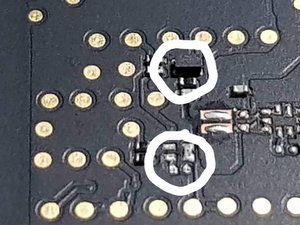
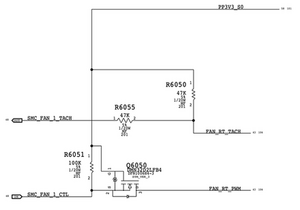
Here is the fan control circuit on the board (It’s missing a MOSFET-[Part#Q6050] and a Resistor-[Part#R6051])

图片


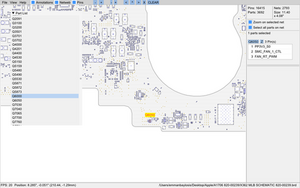
Here’s the location of the parts on the board

图片

Here’s the diagram for the fan control circuit

图片


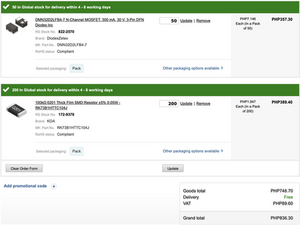
Finally, here’s the parts that you need (They’re really tiny haha)

图片

这个答案有帮助吗?

得分 1

3条评论:

I got issue can't seem to find the location for left fan components A1707 macbook 2017

由完成的

Very lucky at the end damged component were found while i was puting A1707 togather keyborad flex which were lefted under the mainboard and pressure cased the damaged to component,reslodered same one but did not work so i have to run a jumper and worked for me

由完成的

@Syed Shah Loor right under the keyboard connector. Bottom side of PCB. You need to remove the board.

由完成的

添加一条评论

请参阅图像内容:

图片
图片

这个答案有帮助吗?

得分 1

1条评论:

When you removed logic board this component check it must have been lose or damdged this is on other side of the right under where you plug cable for keybaord

由完成的

添加一条评论

i have mid 2015 15” Macbook Pro, its right fan is showing 5700 rpm max but left one is 6156 rpm max at mac fans control app. Shouldn’t they be at same rpm? Or is it normal as default?

这个答案有帮助吗?

得分 0

5条评论:

on my 2016 15" Pro Left 5927 Right 5489, seems that it is normal

由完成的

@Sergey Alright thank you!

由完成的

just recover broken MOSFET (you need a donor board, microscope (lens is not enough), and small soldering iron, if trace is broken you will need a thin wire also) and FAN control will be available again.

由完成的

Check Q6050 and Q6000 on board and resistors near too. For model A1707.

由完成的

Exactly! Thanks!

由完成的

添加一条评论

In A1707 the location of the mosfets is right under the keyboard connector (oposite side of PCB). In my case the components were still there, but the left fan was running at full speed all the time. Did a reflow (apply solder paste and then hot air with SMD solder station) but it did not work. So, I bridged the Drain pins of both mosfets and now both fans are controlled by the right side driver. There are test pads for the Drain pins, so solder is easy by bridging those pads.

The laptop seems to be working fine with both fans controlled together, but you can install Mac Fan Control or similar app to assign more sensors to drive the good mosfet.

这个答案有帮助吗?

得分 0

2条评论:

can you upload a picture how did you made it? thx

由完成的

Can you share a picture of the work you did? Was it relatively easy?

由完成的

添加一条评论

I’ve had the same issues plus gradual disappearance of thunderbolt ports functionality for a couple of years. And I resolved those all just today by replacing the original ports with couple of ones from AliExpress. To be honesty, I was afraid to completely break the device, and when I booted after replacement and have still been seeing same issues, I’ve thought “at least it is alive” and go for a rest. After a couple of hours without any resetting of SMC or PRAM it shouted up the fans (silence! finally!) and gradually kick up the ports so I finally can use HDPI 4K@60Hz, full-speed external hard drives and firewire audio interface via thunderbolt. It is epic win for just a $20! \ 0 /

这个答案有帮助吗?

得分 0
添加一条评论

添加你的答案

Tristan Bertin 将永远感激不已
浏览统计数据:

过去 24 小时: 1

过去 7 天: 22

过去 30 天: 57

总计 8,655