
跳转到主内容

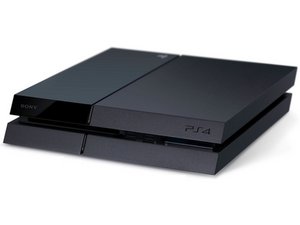
索尼电脑娱乐发布的电视游戏主机。于2013年1月20日发布,2013年11月15日上市。

PS4 Power Button & Disc Button Unresponsive!

I recently disassembled my ps4 to clean it out and put new thermal paste, and noticed that my ps4 power and disc button won't work. (Also won't let me insert disc)

My controller will turn my ps4 on but when it turns on it makes three beeps and alot of different sounds kinda like the disc reader or something, the ps4 does turn on and work normally afterwards and I can use it normally, but can't use the disc button, power button, or put in disc.

Any suggestions to fix it? I tried taking of and putting back on the covers and it didn't work.

已回答! 显示答案 我也有这个问题

这是一个好问题吗?

得分 2
1条评论

My ps4 power button broke but turns on with M controller. When it comes on it's in safe mode how do I get out of safe mode with out holding down power button

完成的

添加一条评论

9个答案

已选择的解决方案

I found a solution!

I decided my last hope was to disassemble my ps4 and reassemble it again.

I just disassembled everything and made sure to do it gently, then after screwed every thing down evenly in a star pattern and made sure to put it together corectly and slowly.

Don't forget to clean all your dust too!

这个答案有帮助吗?

得分 0

3条评论:

hello forgive my writing. I also have your problem after a thermal paste check. Can it be the tab that touches the power button? It only gives me three beeps and does not turn on. The controller made the mistake of associating it with another ps4 and now I can not start it anymore.

完成的

It’s precisely the tape that goes from under the power supply to the cd reader, it needs to be put precisely in it’s place by milimetres, or else the buttons won’t work. Instead of wasting half an hour by disassembling every part from the beginning, just unplug that tape and plug it back in precisely. You’ll save yourself a lot of time.

完成的

@abdurrahman Abdurrahman Shabani could you please be more specific on which tape? I have this issue and would appreciate your assistance

完成的

添加一条评论
最有帮助的答案

Thank’s man I had the exact same issue and fixed it in minutes.

All I did was to take the screws from the up side and remove the dvd cable from the down side.

I also removed and put back in the power supply and powered it on.

Then while still on I plugged the dvd cable and then restarted my ps4.

And everything was fixed.

这个答案有帮助吗?

得分 1

2条评论:

This made no sense?

完成的

I second this , what I did was first i removed the power supply and

removed completely the CD box and his cable and put back the power supply to test it ,guess what? It worked the ps4 turned on by touching power button(without CD box). So now I put back the CD box and I think the issue was the cable connecting ( CD box-Motherboard) wasn't placed properly I put it back the cable gently using a Youtube video and thankfully my ps4 power button work nicely.

完成的

添加一条评论

hello forgive my writing. I also have your problem after a thermal paste check. Can it be the tab that touches the power button? It only gives me three beeps and does not turn on. The controller made the mistake of associating it with another ps4 and now I can not start it anymore.

这个答案有帮助吗?

得分 0
添加一条评论

Sorry i have the exact same problem, can someone tell me how to fix it ?@chiefxxii @filekt

Thanks.

这个答案有帮助吗?

得分 0

1条评论:

Dissasemble and reassemble it.

完成的

添加一条评论

I'm having the exact same problem except I'm not getting any beeps. This happened after disassembling it to replace the thetmal paste and doing a complete cleaning… What sucks is that I can't go into safe mode to try and do any updates, file system rebuilds, nothing. The buttons just won't do anything, I can't put a disc in. I've tried opening it up, taking it apart, reassembling it, 3 times.. somehow ending up with an extra screw the 3rd time. Ugh. I'm super !#^&@@ and I feel like I broke my ps4, trying to fix it and keeping it from frying the cpu.. my thermal paste was toast.. ugh.. gonna go pound my head against the wall.

这个答案有帮助吗?

得分 0

2条评论:

Did you find a sollution? I have same exact problem.

完成的

If ur are not getting any lights make sure power supply is connected properly. That’s the power supply module you have to unplug to get to Wi-Fi antenna. Make sure power cord is connected properly. Then also make sure all cables connected properly and you have no broken cables or missing components on motherboard. Then try powering it up again.

完成的

添加一条评论

Hi guys, I have the same problem, I the power button does not click, it’s jammed.

这个答案有帮助吗?

得分 0

2条评论:

Then why not un-jam it dude?

完成的

You just need to push down on the power button where it latch in towards the backend of the button. There is a square space where a notch on the backend of the button locks into. Just push down on that end and pull the button out and try reinserting it.

完成的

添加一条评论

Same problem for me.. have you solution ?

这个答案有帮助吗?

得分 0

1条评论:

Put on ebay for $350

完成的

添加一条评论

power & eject button

not responding,

can only be turned on using controller or disc

.please help.

这个答案有帮助吗?

得分 0

1条评论:

My buttons are jammed and my game has a disc in it . my controller isnt turning my game on now what do I do ?

完成的

添加一条评论

For power button:


You just need to push down on the power button where it latch in towards the backend of the button. There is a square space where a notch on the backend of the button locks into. Just push down on that end and pull the button out and try reinserting it. Note don’t disc eject button maybe the same.

这个答案有帮助吗?

得分 0
添加一条评论

添加你的答案

Jacob Warren 将永远感激不已
浏览统计数据:

过去 24 小时: 2

过去 7 天: 23

过去 30 天: 103

总计 27,179

